

NOTAMSpot — Live Demonstration
Real-World Screenshots and Features
Date December 2025
Plataforma: Browser extension for Chrome, Edge, and Firefox
Introduction
ℹ️ Important: Screenshots below show NOTAMSpot operating on third-party public portals. This is an independent extension, not affiliated with or endorsed by any government agency (FAA, NOAA, DECEA, Nav Canada).
NOTAMSpot is a browser extension specialized in aviation safety analysis, designed to automatically detect critical risks in NOTAM (Notices to Airmen), METAR (Meteorological Aerodrome Report), and TAF (Terminal Aerodrome Forecast) documents on official aeronautical information portals.
This page presents real screenshots of the extension operating on major aeronautical portals in the United States, Brazil, and Canada, demonstrating its capabilities for real-time risk detection, analysis, and categorization.
1. FAA FNS NOTAM Search — U.S. Federal System
The Federal NOTAM System (FNS) is the official NOTAM system of the Federal Aviation Administration (FAA) of the United States.
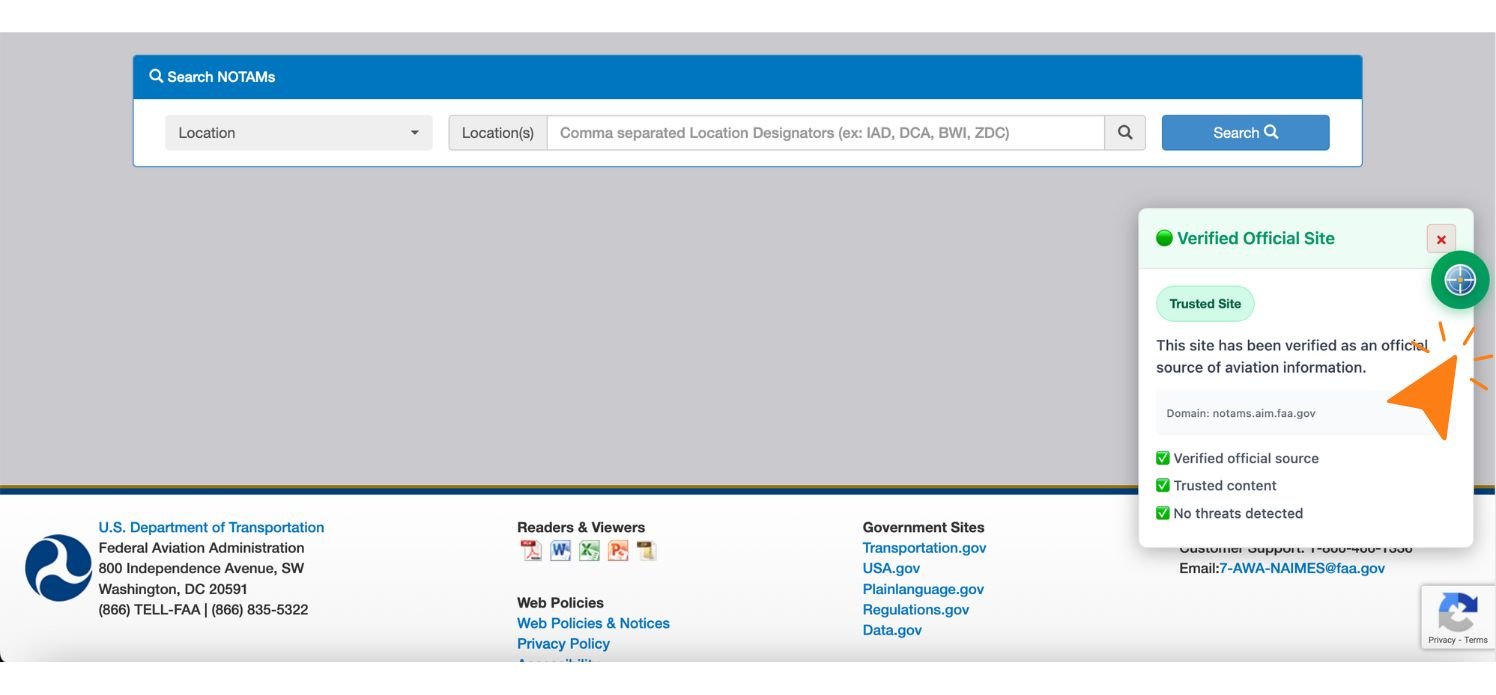
Figure 1.1 — FNS NOTAM Search homepage displaying automatic security validation. The green floating icon (right corner) confirms that the domain notams.aim.faa.gov is an official government portal. The system compares the URL against a whitelist of official domains, blocking analysis on unauthorized sites. This additional layer protects against aviation-sector phishing attacks.
⚠️ Independent extension. Not affiliated with or endorsed by any government agency.
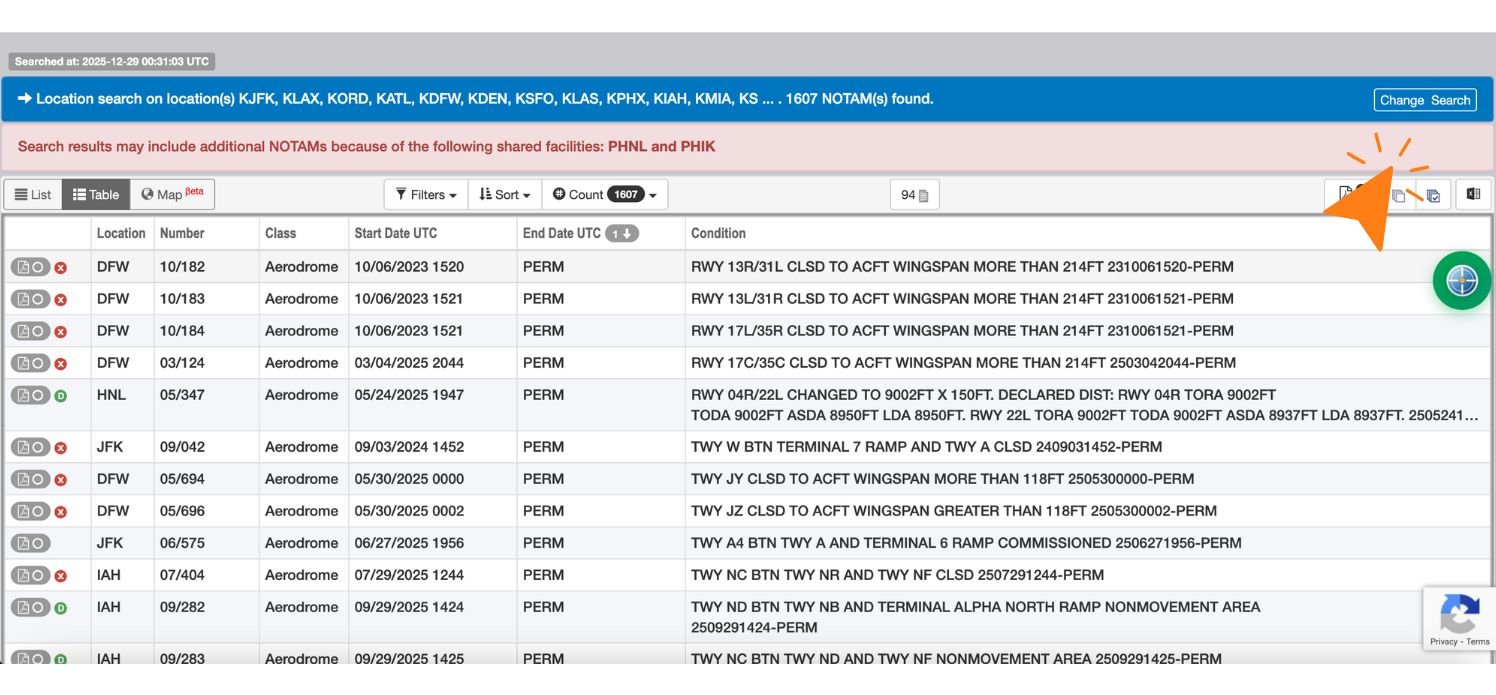
Figure 1.2 — Initial query on FNS NOTAM Search (without NOTAMSpot analysis active). The user enters multiple airports (KJFK, KLAX, KORD, etc.) and executes the search, generating a list of 1,659 available NOTAMs. This is the pre-processing stage where the system awaits results loading before activating scanning.
⚠️ Independent extension. Not affiliated with or endorsed by any government agency.
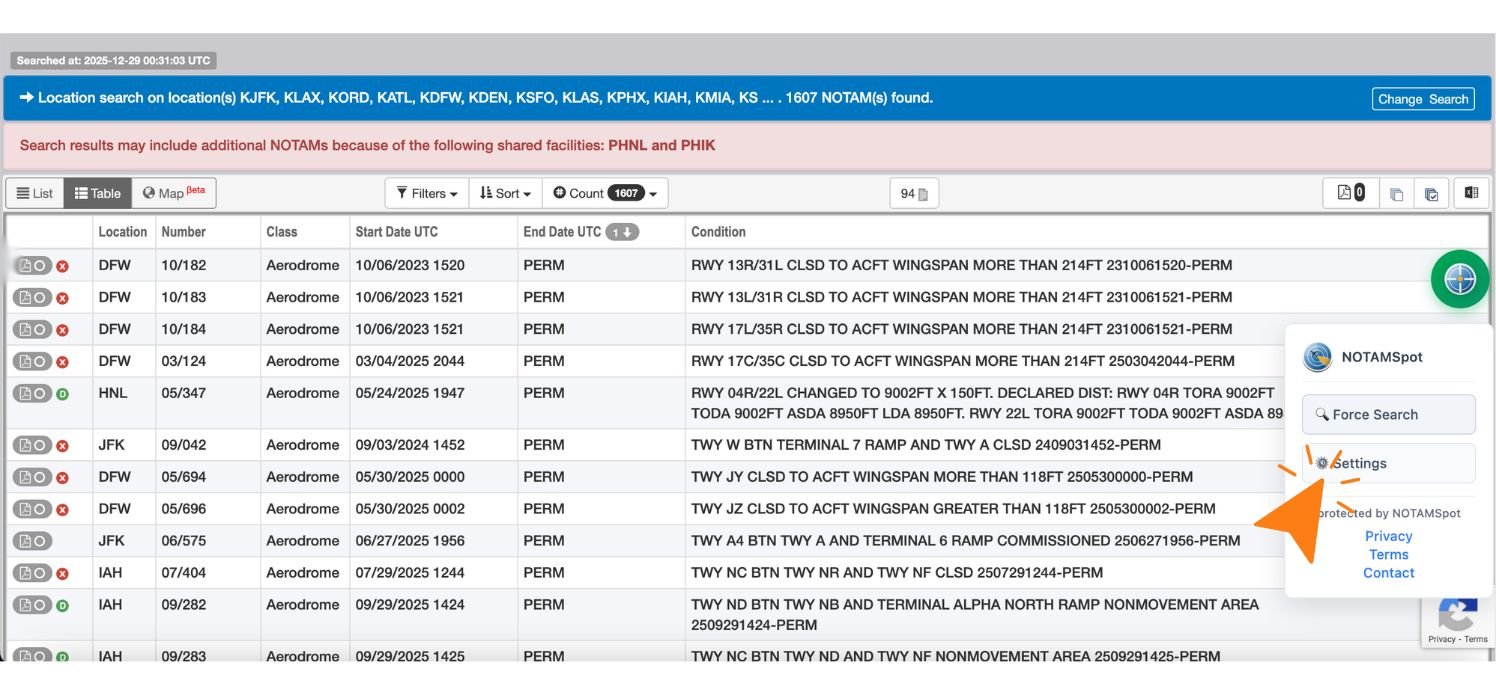
Figure 1.3 — Manual scan activation on FNS NOTAM Search. Hover over the green floating icon → panel expands → click "Force Search". NOTAMSpot initiates complete analysis of 1,659 NOTAMs, processing each entry in the "Condition" column for real-time risk detection and categorization.
⚠️ Independent extension. Not affiliated with or endorsed by any government agency.
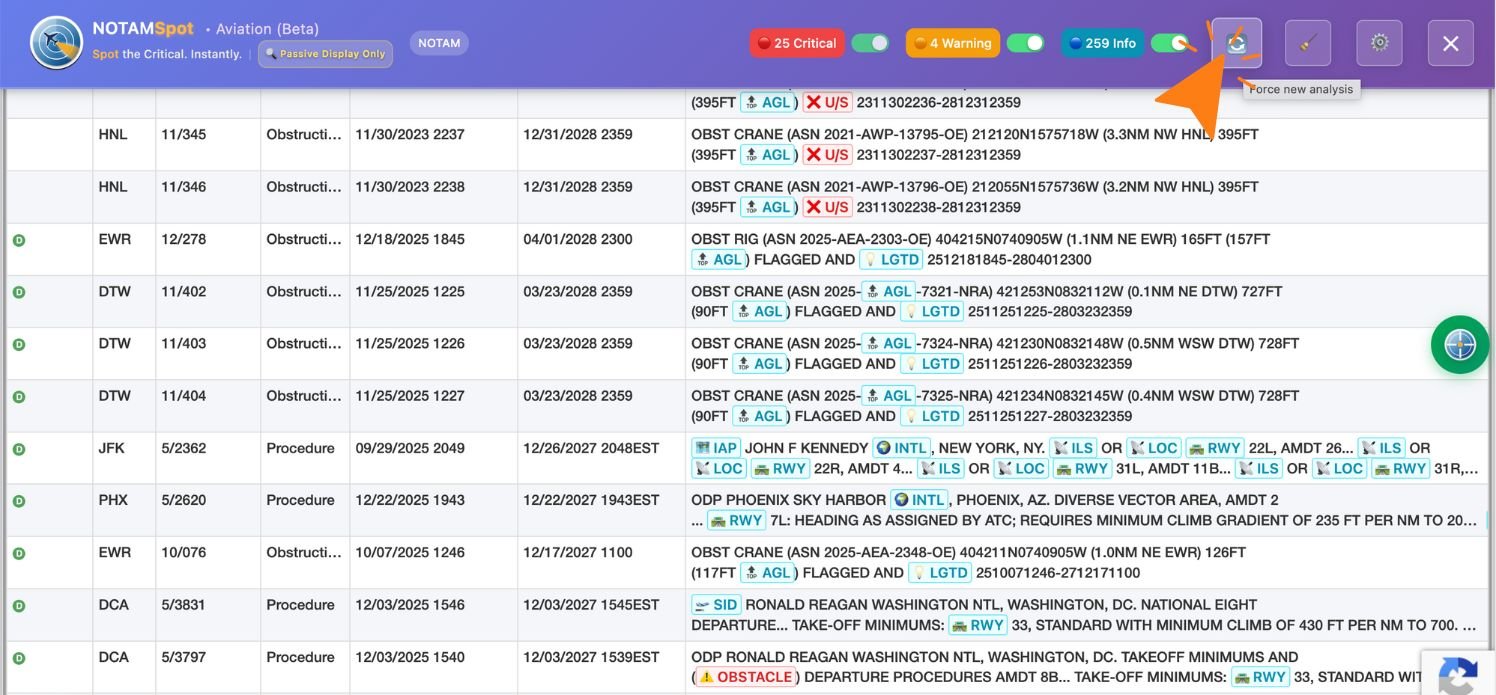
Figure 1.4 — Infinite scroll with dynamic updates on FNS NOTAM Search. Scroll down → new NOTAMs load automatically → click "Update" on NOTAMSpot panel. The system restarts scanning, continuously processing new items as they appear on screen, maintaining real-time categorization.
⚠️ Independent extension. Not affiliated with or endorsed by any government agency.
Direct Link: https://notams.aim.faa.gov/
Description: Results page displaying 1,659 NOTAMs found for identifiers KJFK, KLAX, KORD, KATL, KDFW, KDEN, KSFO, KLAS, KPHX, KIAH, KMIA, and others. NOTAMSpot is processing and categorizing NOTAMs in real time.
Analysis badges:
25 Critics (red)
4 Attention (orange)
259 Info (ciano)
2. Aviation Weather Center — U.S. Portal (NOAA)
The Aviation Weather Center (aviationweather.gov) is operated by the National Oceanic and Atmospheric Administration (NOAA) and provides aeronautical meteorological data for the United States.
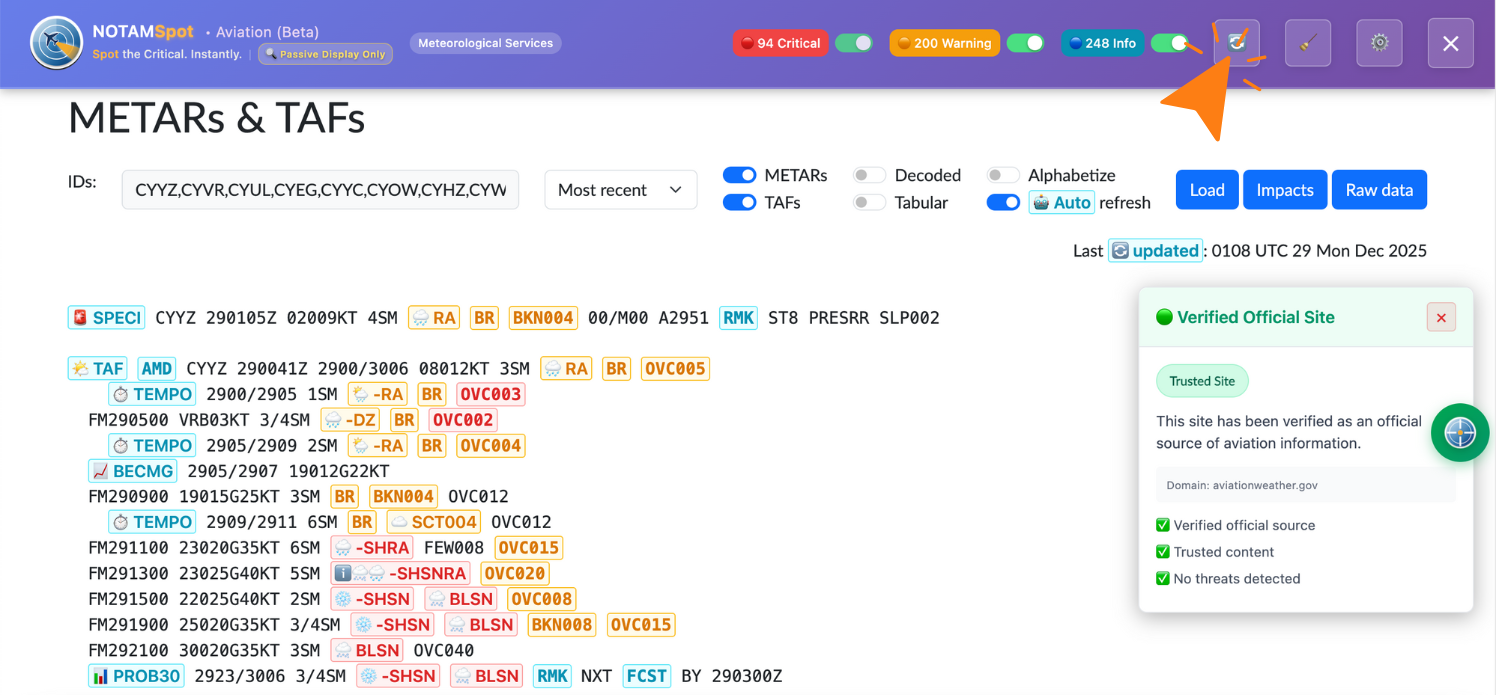
Figure 2.1 — Aviation Weather Center (NOAA) with automatic METAR/TAF analysis. NOTAMSpot activates instantly upon page load, scanning all meteorological reports (SBGR, SBSP, SBBR, etc.). Click "Refresh" at the top to re-execute.
⚠️ Independent extension. Not affiliated with or endorsed by any government agency.
Direct test: aviationweather.gov/data/metar
3. AISWEB — Brazilian Portal (DECEA)
AISWEB is the official aeronautical information system of Brazil's Department of Airspace Control (DECEA). The screenshots below demonstrate NOTAMSpot operating on data from Santos Dumont / Rio de Janeiro (SBRJ).
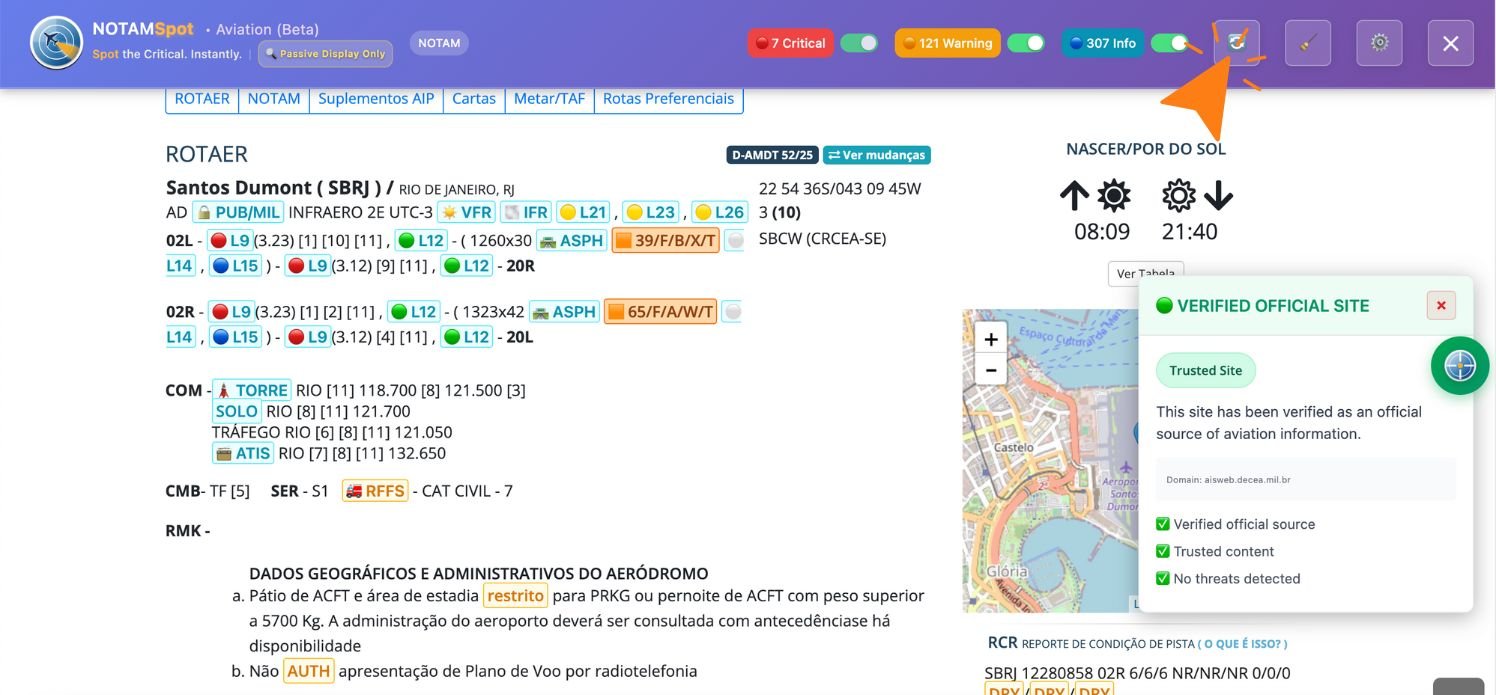
Figure 3.1 — AISWEB (DECEA) with automatic NOTAM analysis. NOTAMSpot activates instantly upon loading the SBRJ page, scanning all reports. Use Critical/Warning/Info toggles and "Refresh" to update.
⚠️ Independent extension. Not affiliated with or endorsed by any government agency.
Direct test: aisweb.decea.mil.br.
4. Nav Canada NOTAM Portal — Canadian System
The Nav Canada NOTAM Portal is the official aeronautical information system operated by Nav Canada, Canada's civil air navigation authority. The screenshots below demonstrate NOTAMSpot operating on data from Canadian airports such as Toronto Pearson (CYYZ), Vancouver (CYVR), and Montreal-Trudeau (CYUL), ICAO designators of Canadian airspace.
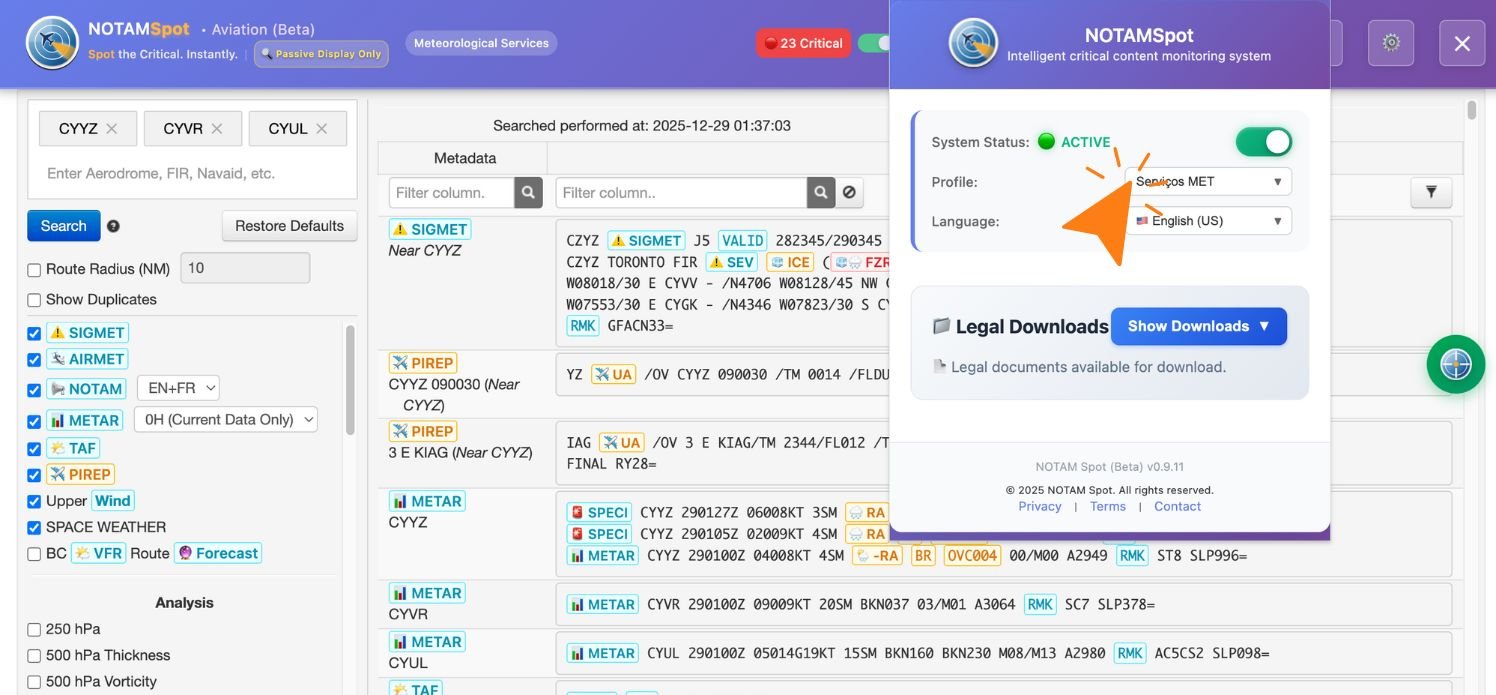
Figure 4.1 — Nav Canada WX Recall with specific service selection. The portal integrates NOTAMs and meteorological services; select "NOTAM" or "Meteorological Services" in NOTAMSpot for targeted scanning. Panel displays CYVR, CYYZ, CYUL with Active status and legal downloads.
⚠️ Independent extension. Not affiliated with or endorsed by any government agency.
Direct Link: plan.navcanada.ca/wxrecall/
Note: NOTAMSpot operates as a browser overlay on publicly accessible portals. Listing below does not imply affiliation, partnership, or endorsement by the respective agencies.
Supported Portals
United States
Canada
Brazil
Latin America
TECHNICAL NOTES
Versão demonstrada: NOTAMSpot (Beta — Aviation)
Data das capturas: December 2025
LEGAL NOTICE
NOTAMSpot is an analysis support tool for aeronautical information and does not replace the professional judgment of pilots, flight dispatchers, or air traffic controllers. All operational decisions must be based on updated official documents and careful analysis according to current aeronautical regulations (ICAO, FAA, ANAC, EASA, Transport Canada).
Regulatory positioning:
ICAO Type A EFB Application (Non-Critical)
FAA Class 2 EFB Advisory Tool
EASA AMC 20-25A Type A Application
ANAC T-PED Category C Compliant
Transport Canada AC 700-020 Type A Compliant
For complete information, consult the AVIATION_DISCLAIMER.txt file available in the extension.
NOTAMSpot Team
© 2025 All rights reserved.
notamspot.com | support@notamspot.com