
NOTAMSpot: Aviation Security Architecture
ℹ️ Important: Screenshots below show NOTAMSpot operating on third-party public portals. This is an independent extension, not affiliated with or endorsed by any government agency (FAA, NOAA, DECEA, Nav Canada).
Complete Guide to Protection Against Cyber Threats
📑 Table of Contents
Introduction
Layer 1: Security Whitelist (First Line of Defense)
1. Mandatory HTTPS Enforcement
2. Secure Context Verification
3. Anti-Homograph Attack Detection
4. Punycode Attack Prevention (xn--)
5. Subdomain Authorization Mapping
6. Unsupported protocols
7. Typosquatting
8. Combosquatting Detection
Layer 2: Security Blacklist (Proactive Blocking)
Layer 3: Security Analyzer (Malicious Code Detection)
APPENDICES
🎯 Introduction
About this document
This technical guide documents the multi-layered security architecture of NOTAMSpot, a browser extension specialized in protecting pilots, aircraft operators, and aviation professionals against cyber threats targeting weather websites (METARs/TAFs), NOTAMs, and flight planning systems.
Civil and military aviation depend on accurate and untampered information to support critical flight-safety decisions. A falsified METAR or an omitted NOTAM can lead to accidents, violations of restricted airspace, and the compromise of sensitive military operations.
Document version: 1.2.0
Last updated: December 2025
Technical basis: security-whitelist.js, security-blacklist.js, security-analyzer.js
Target audience
This document is intended for:
Technical reviewers:
Cybersecurity engineers
Regulatory compliance analysts (ANAC, FAA, EASA)
Aviation systems architects
Aeronautical software certification auditors
End users:
Commercial and military pilots
Flight dispatchers (DOV)
Air traffic controllers
Electronic Flight Bag (EFB) operators
Flight safety managers
IT administrators:
Airline infrastructure managers
Armed forces cybersecurity teams
Compliance owners (PCI DSS, ISO 27001, SOC 2)
How to use this guide
Navigation: Use the clickable index to jump directly to sections of interest.
Technical level: Each section starts with a conceptual explanation and progresses into implementation details.
Practical examples: All attacks are illustrated with real-world aviation scenarios.
Source code: JavaScript code snippets show effective implementation of NOTAMSpot
Statistics: Global incident data and documented cases validate the relevance of the threats.
Visual conventions:
✅ Green: Safe/permitted behavior
❌ Red: Threat detected/blocked
⚠️ Yellow: Warning/attention needed
🔒 Padlock: Related to cryptography/HTTPS
✈️ Plane: Specifically for aviation
NOTAMSpot implements a defense-in-depth strategy against web threats, with three specialized modules that work together to protect aviation professionals while accessing critical information.
🏗️ Architecture Overview
text
┌─────────────────────────────────────────────────────────────┐
│                    USER / BROWSER                           │
└──────────────────────┬──────────────────────────────────────┘
                       │
        ┌──────────────┴──────────────┐
        │  NOTAMSpot Engine   │
        └──────────────┬──────────────┘
                       │
    ┌──────────────────┼──────────────────┐
    │                  │                  │
┌───▼─────┐      ┌─────▼──────┐     ┌─────▼─────┐
│ LAYER   │      │  LAYER 2   │     │ LAYER 3   │
│   1     │ ───▶│ BLACKLIST  │───▶│ ANALYZER  │
│WHITELIST│      │  BLOCKING │     │  XSS/CSP  │
└─────────┘      └────────────┘     └───────────┘
   ✅ Approved       🚫 Blocked       ⚠️ Suspicious
🛡️ Layer 1: Security Whitelist (First Line of Defense)
Objective
To ensure that only official government aviation domains are considered trusted, blocking beforehand any attempt at spoofing, typosquatting, or homograph attacks.
✅ APPROVED BY WHITELIST
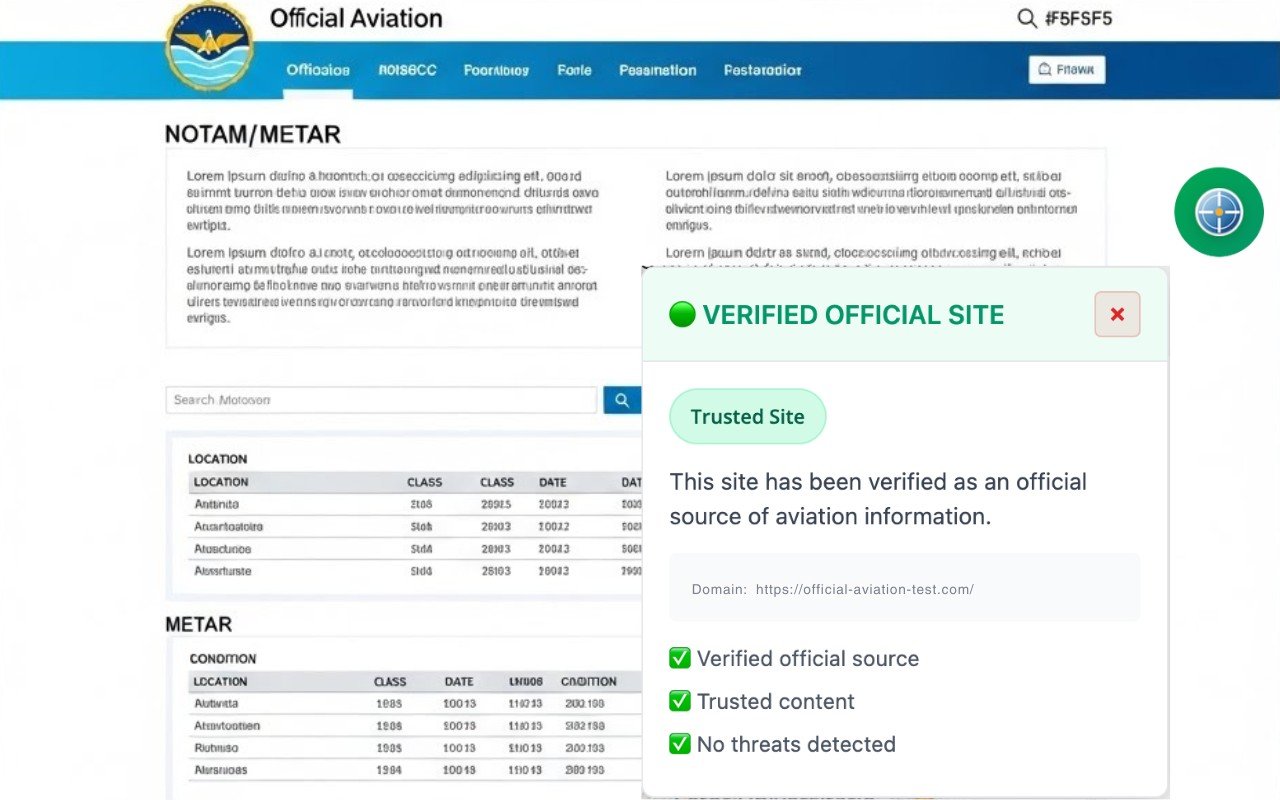
Figure 01: Real-time domain validation with a green “Verified Official Site” indicator. The NOTAMSpot floating panel confirms that the URL belongs to an official aeronautical source (Layer 1 — Whitelist), validating reliable content and the absence of detected threats before initiating any analysis.
⚠️ Independent extension. Not affiliated with or endorsed by any government agency.
❌ REJECTED BY BLACKLIST
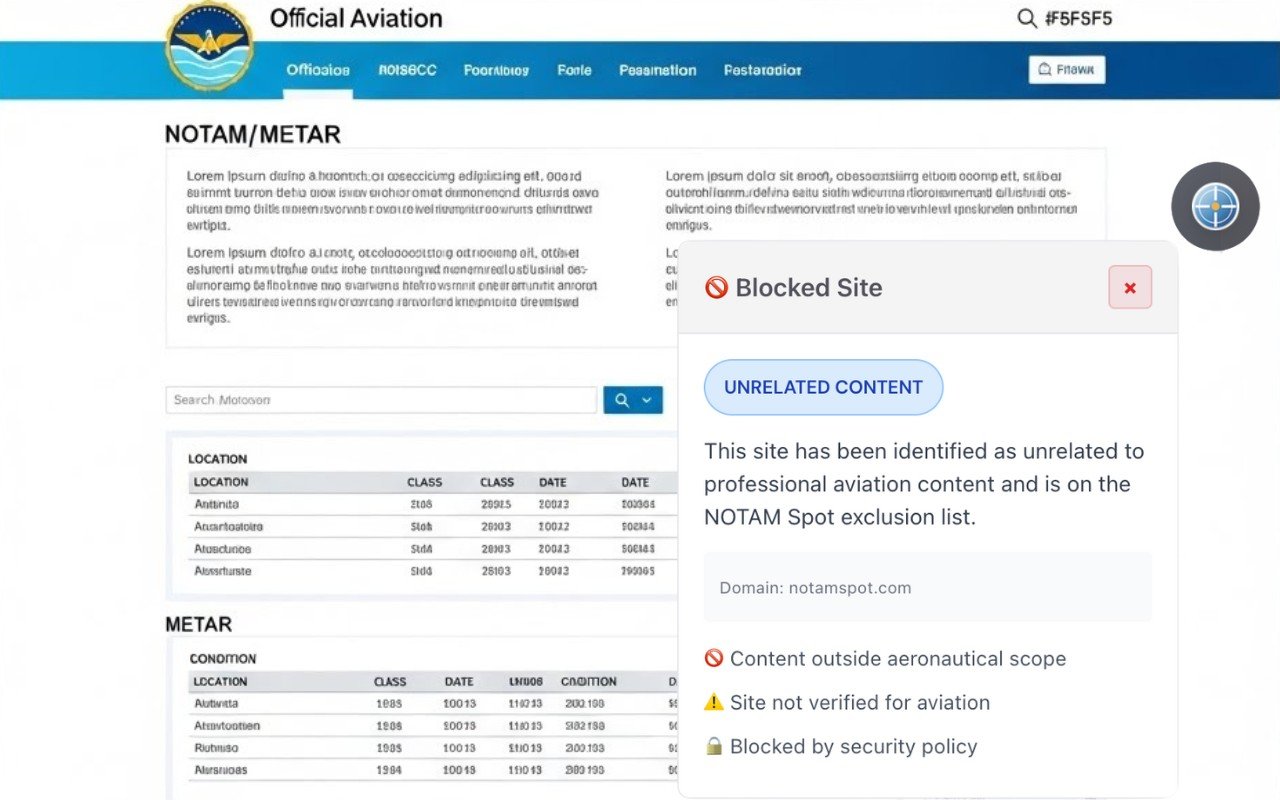
Figure 02: Preventive blocking by scope: the accessed page is not on the NOTAMSpot whitelist and was identified as content outside the aeronautical context. Even without evidence of an active threat, access is restricted by security policy to prevent analysis of unverified sources.
⚠️ Independent extension. Not affiliated with or endorsed by any government agency.
Implemented Protections
✅ 1. Mandatory HTTPS Enforcement
❌ REJECTED (insecure protocol)
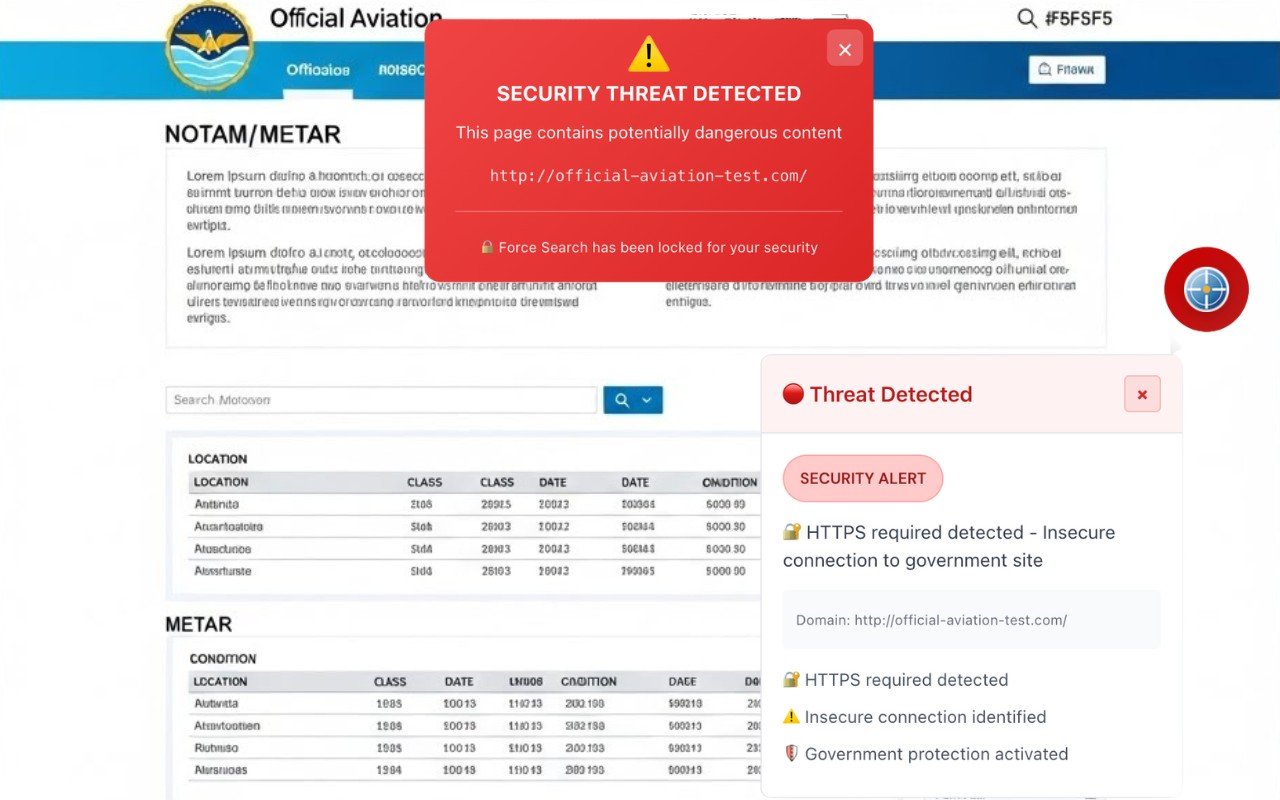
Figure 3: Detection of an insecure HTTP protocol in a simulation on the website aisweb.decea.mil.br. NOTAMSpot displays a red alert "SECURITY THREAT DETECTED" and blocks access due to the absence of mandatory HTTPS, demonstrating Layer 1 (Whitelist) enforcement even on government domains when the protocol is not secure.
⚠️ Independent extension. Not affiliated with or endorsed by any government agency.
How does HTTPS protect?
1. Data encryption in transit
HTTPS uses TLS/SSL protocols to encrypt all communication between the browser and the server.
text
Client → "username=pilot123&password=abc123" → Server
         ↑ Plain text, readable by any intermediary

HTTPS (secure):
Client → "aF3x9K...encrypted...m2Lp8" → Server
         ↑ Illegible even if intercepted
Protected data:
Passwords and login credentials
Credit card numbers
Personal data (ID, address)
Session cookies
Search queries
Browsing history
2. Server Authentication
Digital certificates prove the identity of the website:
The browser verifies if the certificate was issued by a trusted Certificate Authority (CA).
It confirms that the domain in the certificate matches the visited domain.
It prevents Man-in-the-Middle (MITM) attacks.
Without HTTPS:
text
User → aisweb.decea.mil.br
       ↓ (intercepted by attacker)
Attacker → aisweb-fake.com (fake server)
With HTTPS:
text
User → https://aisweb.decea.mil.br
       ↓ Valid digital certificate verified
       ✅ Authenticated connection with legitimate server
3. Data Integrity
HTTPS ensures that data is not modified during transmission:
Scenario without HTTPS (HTTP):
Attacker intercepts response from
aviationweather.govserver.Modifies METAR:
SBGR 081200Z 09008KT 9999 FEW030→ adulterated.Pilot receives false meteorological information.
Accident risk due to decision-making based on incorrect data.
With HTTPS:
Any modification breaks the cryptographic signature.
The browser detects tampering and blocks the connection.
The user sees a security error instead of corrupted data.
HTTP Strict Transport Security (HSTS)
HSTS is the technical mechanism that forces HTTPS automatically:
How it works
The server sends a special HTTP header:
text
Strict-Transport-Security: max-age=31536000; includeSubDomains; preload
Effects:
Browser automatically converts
http://tohttps://for up to 1 year.Blocks access if the SSL certificate is invalid (no "accept risk" option).
Protects subdomains (
aisweb.decea.mil.br,redemet.decea.mil.br).Prevents SSL stripping attacks.
Attacks Prevented by HSTS
1. SSL Stripping:
text
Without HSTS:
User types → aisweb.decea.mil.br
              ↓ (without https://)
Browser tries → http://aisweb.decea.mil.br
Attacker intercepts → keeps insecure HTTP
Victim never sees HTTPS

With HSTS:
User types → aisweb.decea.mil.br
Browser forces → https://aisweb.decea.mil.br
Attacker blocked → direct secure connection
2. Cookie Hijacking:
Session cookies sent via HTTP are stolen by sniffers.
HSTS ensures cookies always encrypted traffic
3. Protocol Downgrade Attacks:
Attacker forces browser to use HTTP instead of HTTPS.
HSTS makes HTTP completely unavailable.
Why it is critical for aviation?
Sensitive data on aviation portals
METARs/TAFs (Meteorology):
aviationweather.govvia HTTP → data can be adulterated.Attacker injects fictitious fog at an airport.
Pilot cancels flight unnecessarily (operational loss).
NOTAMs (Notices to Air Missions):
aisweb.decea.mil.brvia HTTP → NOTAM can be omitted.TFR (Temporary Flight Restriction) does not appear for the pilot.
Violation of presidential airspace → fine of US$ 50,000+
Access Credentials:
Login at
notams.aim.faa.govvia HTTP → password intercepted.Attacker accesses flight planning system.
Modifies filed flight plans or steals commercial routes.
Government Mandates
United States:
Federal government mandated HTTPS-only for all
.govsites since 2015.Includes FAA, NOAA, NWS (aviation services).
Brasil:
.mil.brsites (DECEA, FAB) require HTTPS by default..gov.br(ANAC, Infraero) follow the same policy.
How NOTAMSpot enforces HTTPS
Based on the figure description (aisweb.decea.mil.br with green indicator), the system implements:
1. 1. Protocol Validation in Layer 1 (Whitelist)
javascript
// Automatic HTTPS verification on official sites
if (url.startsWith('http://aisweb.decea.mil.br')) {
  // ❌ BLOCKS access via insecure HTTP
  showAlert('Mandatory HTTPS for official aviation sites');
  suggestSecureURL('https://aisweb.decea.mil.br');
}

if (url.startsWith('https://aisweb.decea.mil.br')) {
  // ✅ ALLOWS access via secure HTTPS
  showGreenIndicator('OFFICIAL SITE VERIFIED');
  validateCertificate(); // Verifies SSL certificate validity
}
2. Visual Security Indicators
When valid HTTPS is detected:
✅ Green badge: "OFFICIAL SITE VERIFIED"
🔒 Status: "Verified official source"
🛡️ Validation: "Reliable content"
✓ Protection: "Absence of detected threats"
3. 3. Insecure Protocol Blocking
If user attempts to access HTTP version:
❌ Red alert: “Insecure protocol detected”
🚫 Blockade: Prevents content from loading.
🔄 Redirection: Suggests automatic HTTPS version.
📊 Log: Logs attempted insecure access for auditing purposes.
4. SSL Certificate Verification
Validates digital certificate:
Issuer: Certificate issued by trusted CA?
Validity: Certificate not expired?
Hostname match: Domain in certificate = visited domain?
Revocation: Certificate has not been revoked?
If any validation fails:
text
⚠️ INVALID SSL CERTIFICATE
🚫 Access blocked for security
📋 Reason: Certificate expired on 11/15/2024
✈️ Aviation sites require valid certificates
5. Layered Protection
Layer 1 (Whitelist):
Verifies if the domain is on the list of official sites.
Requires HTTPS for all 50+ aviation portals.
Automatically validates the SSL certificate.
Layer 2 (Blacklist):
Blocks HTTP versions of sites that must use HTTPS.
Detects SSL stripping attempts.
Layer 3 (Content Analysis):
Checks security headers (HSTS, CSP).
Alerts if an official site no implements HSTS
Benefits for Flight Operational Safety
Meteorological Data Integrity:
METARs/TAFs cannot be tampered with in transit.
Pilots trust meteorological data for go/no-go decisions.
NOTAM Authenticity:
Runway closure notices are authentic.
TFRs cannot be omitted by attackers.
Credential Protection:
Login to flight planning systems is secure.
Military/commercial credentials are not intercepted.
Regulatory Compliance:
ANAC, FAA, EASA require the use of secure systems.
HTTPS is a minimum requirement for EFB certification.
By enforcing mandatory HTTPS and validating SSL certificates, NOTAMSpot ensures that pilots access only authentic and unadulterated versions of information critical to flight safety, aligned with cybersecurity practices required by civil and military aviation regulators globally.
✅ 2. Secure Context Verification
Secure Context Verification is the verification that ensures the page is running in an environment considered secure by the browser and W3C recommendations. With this, NOTAMSpot stops the extension's execution whenever it detects an insecure context, preventing its resources from operating on potentially compromised pages.
What is a "Secure Context"?
A context is considered secure when it meets these criteria:
Active HTTPS – The connection uses valid TLS/SSL.
localhost/127.0.0.1 – Local development environments.
file:/// – Local files (with restrictions).
No insecure frames – No HTTP iframes on an HTTPS page.
Service Workers enabled – Modern APIs available.
Why does this matter for security?
When window.isSecureContext = false, it means that:
❌ The page may be compromised by:
Man-in-the-middle attacks (MITM)
Code injection via unencrypted HTTP.
Downgrade attacks (forcing HTTP instead of HTTPS).
Malicious iframe embedded in a legitimate page.
❌ Critical APIs are disabled:
Geolocation API
Service Workers
Web Crypto API
Clipboard API (async)
getUserMedia (camera/microphone)
| Situation | isSecureContext | Action by SCG |
|---|---|---|
https://aisweb.decea.mil.br | ✅ true | Allows access |
http://aisweb.decea.mil.br | ❌ false | Blocks (no HTTPS) |
| HTTPS with internal HTTP iframe | ❌ false | Blocks (mixed content) |
| HTTP proxy intercepting traffic | ❌ false | Blocks (suspected MITM) |
| localhost:3000 (dev) | ✅ true | Permits (local environment) |
DevTools Console:
> window.isSecureContext
true // ✅ Safe site

> window.location.protocol
"https:" // ✅ Secure protocol

> document.domain
"aisweb.decea.mil.br" // ✅ Trusted domain
✅ 3. Anti-Homograph Attack Detection
Detects attacks that use visually similar Unicode characters to deceive the user:
| Legitimate Domain | Homograph Attack | Status |
|---|---|---|
aviationweather.gov | aviatiοnweather.gov (ο greek) | 🚫 BLOCKED |
faa.gov | fаa.gov (а cyrillic) | 🚫 BLOCKED |
aisweb.decea.mil.br | aiswebb.decea.mil.br | 🚫 BLOCKED |
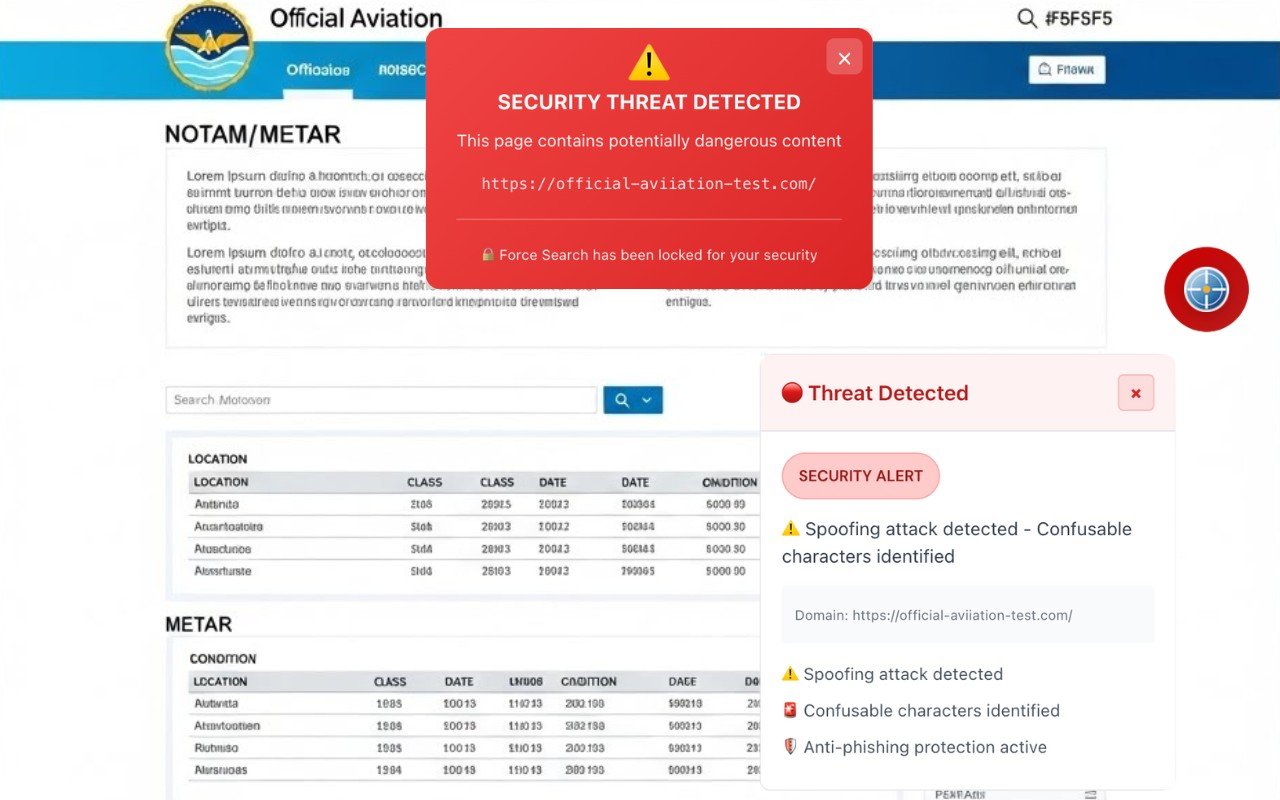
Figure 4: Simulation of a typosquatting/impersonation attack: NOTAMSpot detects a suspicious domain variation (e.g., "aviation" with confusing characters) and triggers a red alert for a security threat, activating anti-phishing protection and blocking the "Force Search" action. This validation is part of Layer 1 (Whitelist), which prevents access to domains that look like legitimate government sources.
⚠️ Independent extension. Not affiliated with or endorsed by any government agency.
📖 What are Homograph Attacks?
Homograph attacks (or homoglyph attacks) are sophisticated phishing techniques that exploit visually identical characters from different alphabets to create fraudulent domains indistinguishable to the naked eye.
Visual example:
text
Legitimate domain:    apple.com
Malicious domain:     аpple.com  ← VISUALLY IDENTICAL
                      ↑
                      Cyrillic letter "а" (U+0430) instead of Latin "a" (U+0061)
To the user, both appear as apple.com in the address bar, but they point to completely different servers.
🔬 How does it work?
1. Exploitation of Unicode and Punycode
The modern internet supports Internationalized Domain Names (IDN) to allow sites in Arabic, Chinese, Russian, etc. This is done through a system called Punycode, which converts Unicode characters to DNS-compatible ASCII.
Process:
text
Attacker registers:  аpple.com (Cyrillic characters)
                     ↓
DNS converts to:     xn--pple-43d.com (Punycode)
                     ↓
Browser displays:    apple.com (Unicode rendering)
                     ↓
Victim sees:         Apparently legitimate domain
2. Confusable Characters
There are thousands of Unicode characters that look like Latin letters:
| Latin (Real) | Cyrillic (Fake) | Greek (Fake) | Unicode Code |
|---|---|---|---|
| a | а | α | U+0430, U+03B1 |
| and | е | ε | U+0435, U+03B5 |
| o | о | ο | U+043E, U+03BF |
| p | р | ρ | U+0440, U+03C1 |
| c | с | – | U+0441 |
| x | х | χ | U+0445, U+03C7 |
| i | і | ι | U+0456, U+03B9 |
Result: Attackers can create "identical" versions of any popular site.
3. Valid SSL Certificates
The attack becomes even more convincing because attackers obtain legitimate HTTPS certificates for homographic domains:
text
https://аpple.com
🔒 Secure connection
✅ Valid certificate issued by Let's Encrypt
Users see the green padlock and trust the site, even though it is fraudulent.
⚠️ What Are the Risks?
For General Users
1. Credential Theft
Fake login page identical to the legitimate site.
User types email and password believing they are safe.
Stolen credentials are used for account hacking.
2. Malware Distribution
Fake site offers "update" or download.
Victim installs ransomware, spyware, or trojan.
Device compromised without visible signs.
3. Financial Theft
Fake versions of banking sites or PayPal.
Credit card data captured.
Fraudulent transactions performed.
For Aviation (NOTAMSpot Users)
4. Adulterated METARs/TAFs
text
Legitimate site:  aviationweather.gov
Fake site:        аviationweather.gov (Cyrillic а)

Falsified METAR served:
SBGR 081200Z 27008KT 9999 FEW030
(False VFR conditions)

Reality:
SBGR 081200Z 27035G50KT 1200 -TSRA
(Dangerous IMC conditions)
Consequence: Pilot makes go/no-go decision based on false data → risk of accident.
5. Omitted NOTAMs
text
Fake site: nоtams.aim.faa.gov (Cyrillic о)

Critical NOTAM omitted:
"Active TFR SBSP 081200-081800Z - Presidential airspace"

Consequence:
- Inadvertent TFR violation
- Fine of US$ 10,000 to US$ 50,000
- Pilot license suspension
6. Compromised Military Credentials
text
Fake site: аisweb.decea.mil.br (Cyrillic а)

Captured login:
- User: capitao.silva
- Password: ********

Attacker gains access to:
- Mission planning systems
- Aeronautical intelligence data
- Military C2 (Command and Control) network
📊 Problem Statistics
Global incidence (2024-2025):
10% of homographic domains have valid HTTPS certificates
220% increase in phishing during pandemics/crises
0.25% of all phishing domains use IDN homograph (but with a 95%+ success rate)
Targeted attacks (APT) and Big Game Hunting ransomware use homograph in 30%+ of cases
Why it is effective:
Users cannot visually detect it
Traditional anti-phishing training fails (users check URL, HTTPS, padlock)
Legacy security tools do not detect it (SEG, regex-based firewalls)
Real case – Jet Airways (2020):
Fake domain:
jetairways.com(missing the “i” in “jetai”)Punycode used to replace characters
Thousands of users had card data stolen from fake ticket purchases
🛡️ How NOTAMSpot Protects
NOTAMSpot implements 5 layers of defense against homographic attacks:
Layer 1: Non-ASCII Character Detection
javascript
✅ Validates each character of domain

❌ Blocks any code outside of the-z, 0-9, point, hyphen

 🔍 Identifies position, Unicode code and source alphabet
Example:
text
Visited URL: aisweb.decea.mil.br

NOTAMSpot detects:
Character: a
Position: 0
Unicode: U+0430
Alphabet: CYRILLIC SMALL LETTER A
Verdict: ❌ BLOCKED
Layer 2: Skeleton Normalization
Converts all confusable characters to their ASCII equivalents.
javascript
Skeleton("аpple.com")          → "apple.com"
Skeleton("micrοsοft.com")      → "microsoft.com"
Skeleton("аviationweather.gov") → "aviationweather.gov"
The system then compares the skeleton with the aviation official domains whitelist.
Layer 3: Byte-by-Byte Validation
Even if the skeleton matches, it verifies if the original bytes are exactly the same:
text
Official domain:  aisweb.decea.mil.br
Bytes:            61 69 73 77 65 62... (pure ASCII)

Visited domain:   аisweb.decea.mil.br
Bytes:            D0 B0 69 73 77 65 62... (starts with Cyrillic)
                  ↑
Verdict: ❌ HOMOGRAPH ATTACK DETECTED
Layer 4: Script Mixing Detection
Identifies the mixing of alphabets (Latin + Cyrillic, Latin + Greek):
text
gооgle.com        → Scripts: [LATIN, CYRILLIC] ❌ BLOCKED
google.com        → Scripts: [LATIN] ✅ ALLOWED
гугл.рф           → Scripts: [CYRILLIC] ✅ ALLOWED (Official Google Russia)
Rule: Aviation domains must use only Latin ASCII.
Layer 5: Punycode Inspection
Decodes xn-- domains and validates against the whitelist:
text
Received URL: https://xn--pple-43d.com

NOTAMSpot processes:
1. Detects xn-- prefix (Punycode IDN)
2. Decodes: apple (Cyrillic characters)
3. Normalizes skeleton: apple
4. Compares to whitelist: NO official "apple" domain
5. Verdict: ⚠️ SUSPICIOUS (displays warning)

If skeleton matched an official domain:
Verdict: ❌ HOMOGRAPH ATTACK - BLOCKED
🎯 Protection Interface
When a legitimate site is accessed:
text
✅ VERIFIED OFFICIAL WEBSITE

🔒 Secure connection validated
📋 Domain: aisweb.decea.mil.br
🛡️ Status: Verified official source
✓ Reliable content
✓ No threats detected
When a homograph attack is detected:
text
⚠️ SECURITY THREAT DETECTED

🎭 Confusing characters detected
Displayed domain: aisweb.decea.mil.br
Normalized skeleton: aisweb.decea.mil.br
Matches: aisweb.decea.mil.br (official website)

🔍 Suspicious characters identified:

a → U+0430 (CYRILLIC SMALL LETTER A)

🚫 Active anti-phishing protection
✈️ Access blocked for security reasons

✅ Correct official domain:

https://aisweb.decea.mil.br

[Access Official Website] [Report Threat]
🔐 Protected Domains List
NOTAMSpot maintains a curated whitelist of critical aviation domains:
✅ 4. Punycode Attack Prevention (xn--)
Blocks malicious IDN domains encoded in Punycode:
❌ BLOCKED
(represents "xn--" with Greek characters)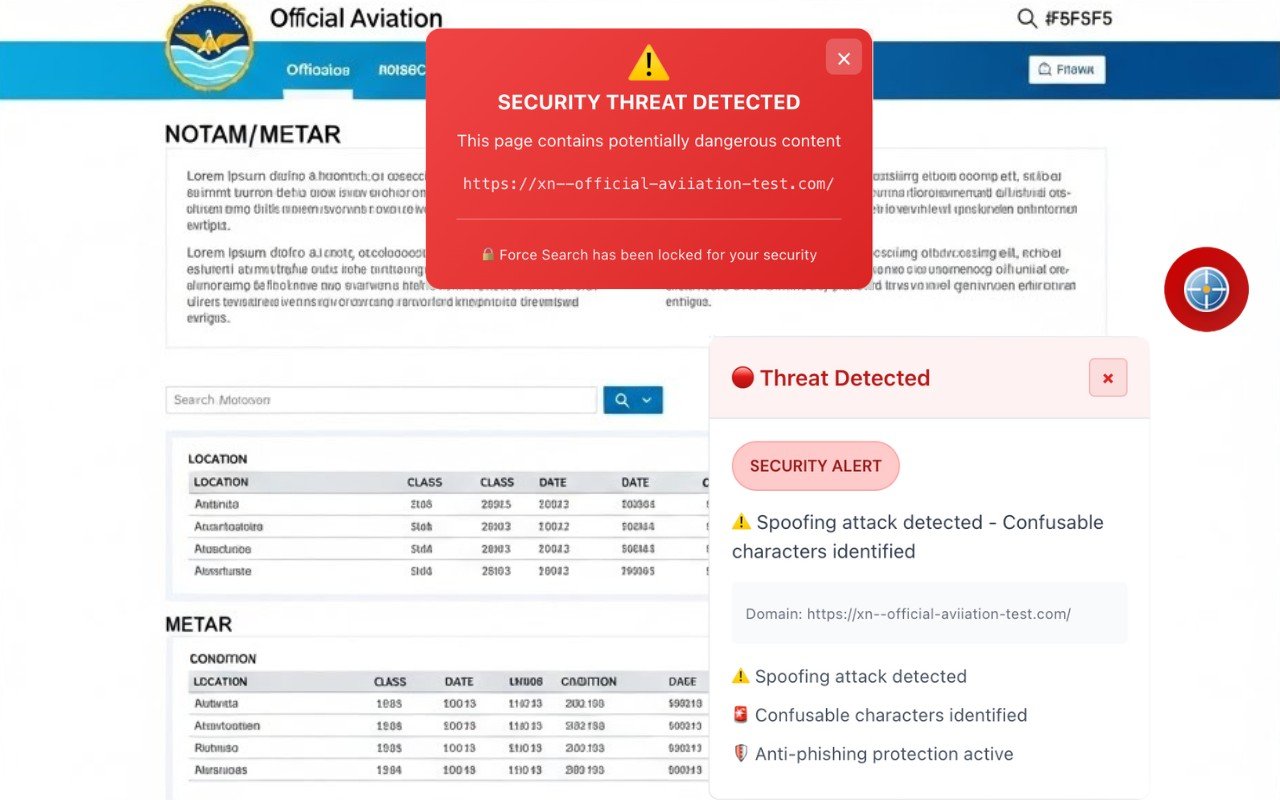
Figure 05: Simulation of spoofing via Punycode (xn--): NOTAMSpot identifies an encoded/obfuscated domain (a common indicator of homograph/typosquatting), marks it as a security threat, and blocks the "Force Search" action. This protection prevents deceptive variations from mimicking official portals, reinforcing Layer 1 (Whitelist) with anti-phishing detection.
⚠️ Independent extension. Not affiliated with or endorsed by any government agency.
What is Punycode?
Punycode is a coding system that converts Unicode characters (non-ASCII alphabets like Cyrillic, Greek, Arabic, Chinese) into ASCII strings compatible with DNS. It was created to allow Internationalized Domain Names (IDN) — domains in non-Latin languages.
How it works
Domains with special characters are converted to the format xn--[code]: xn--[code]:
αρριϵ(Greek letters resembling "apple") →xn--mxail5aamicrоsоft.com(using Cyrillic "о") →xn--microsft-5xa.comаррӏе.com(Cyrillic characters) →xn--pple-43d.com
Modern browsers render these domains in Unicode form in the address bar, hiding the xn-- code and making the attack invisible.
How it impacts security: Homograph Attacks
Homograph attacks exploit the visual similarity between characters from different alphabets to create domains that are visually identical to legitimate websites.
Examples of confusable characters
| Legitimate (ASCII) | Fake (Unicode) | Unicode Code |
|---|---|---|
a | а | U+0430 (Cyrillic) |
o | о | U+043E (Cyrillic) |
and | е | U+0435 (Cyrillic) |
i | ı | U+0131 (Latin without period) |
t | τ | U+03C4 (Greek tau) |
Documented real cases
Coinbase phishing (2025):
Fraudulent domain:
coınbase.com(usingıU+0131)Encoded as:
xn--conbase-[code].comVictims typed credentials thinking they were on the official site
Microsoft spoofing:
Fake domain:
micrоsоft.com(two Cyrillicоs)Visually identical to legitimate
microsoft.comUsed to distribute malware in phishing campaigns
Why it is dangerous
Bypass of filters: URLs encoded in Punycode (
xn--) go unnoticed by regex and traditional blocklistsVisual invisibility: Browsers show
аpple.cominstead ofxn--pple-43d.com, deceiving even experienced usersUnlimited scale: With thousands of Unicode characters available, attackers can generate infinite variations of any domain
Detection evasion: Emails and logs show
xn--strings that look harmless, slowing down security team responses
How NOTAMSpot detects
In the context of SmartContentGuard protection:
The system identifies the
xn--prefix in the domainhttps://xn--aisweb.decea.mil.brDecodes the Punycode and compares it with the list of known official domains
Detects confusable characters (e.g., Cyrillic
аvs Latina)аCyrillic vsaLatin)Classifies it as a spoofing/homograph attack
Blocks access and displays a red alert
This protects pilots and aviation operators against fake pages imitating official portals like AISWEB, preventing credential theft or the download of tampered weather/NOTAM information.
✅ 5. Subdomain Authorization Mapping
Only explicitly mapped subdomains are allowed:
| Base Domain | Authorized Subdomains | Example Blocked |
|---|---|---|
faa.gov | www, notams.aim, pilotweb.nas | phishing.faa.gov 🚫 |
decea.mil.br | aisweb, redemet, servicos | fake.aisweb.decea.mil.br 🚫 |
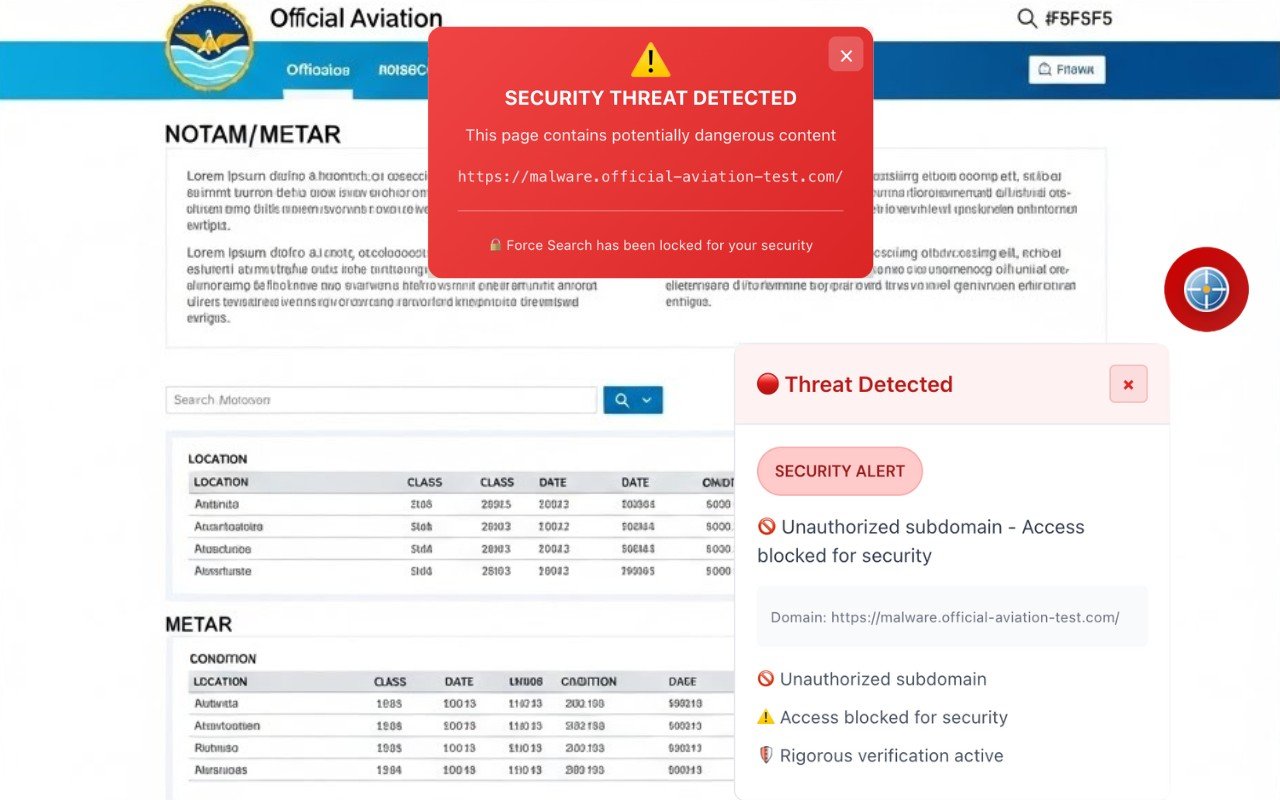
Figure 06: Simulation of a malicious subdomain: even when the base domain appears legitimate, NOTAMSpot applies subdomain mapping and authorization. Upon identifying an unauthorized subdomain (e.g., malware.*), the system triggers a red alert for a security threat and blocks access, preventing "Force Search" and avoiding analysis on a potentially compromised endpoint.
⚠️ Independent extension. Not affiliated with or endorsed by any government agency.
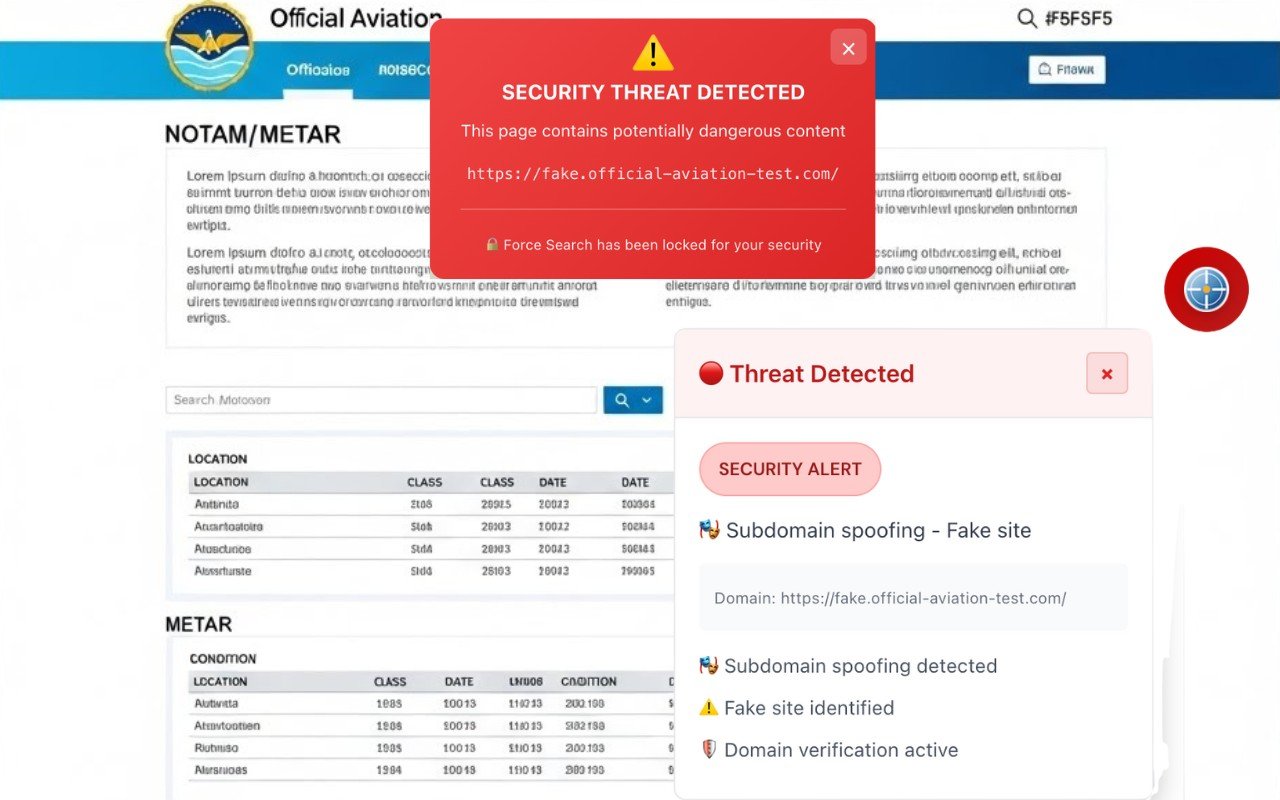
Figure 07: Simulation of subdomain spoofing: NOTAMSpot identifies a deceptive subdomain (e.g., fake.*) used to mimic a legitimate aeronautical portal. Upon detecting the attempted spoofing, the system displays a red security threat alert, flags "Fake site," and blocks the "Force Search" action, preventing analysis and interaction with untrusted endpoints.
⚠️ Independent extension. Not affiliated with or endorsed by any government agency.
📖 What is Subdomain Authorization Mapping?
Subdomain Authorization Mapping is a security system that maintains an authorized mapping of legitimate subdomains for each official domain, automatically blocking access to unauthorized, malicious, or compromised subdomains.
Domain and subdomain structure:
text
Root domain:       aviationweather.gov
                           ↓
Subdomains:        ┌──────┴──────┐
                    ↓             ↓
            [www.aviationweather.gov](https://www.aviationweather.gov)  adds.aviationweather.gov
                    ✅ AUTHORIZED        ✅ AUTHORIZED

            malware.aviationweather.gov  phishing.aviationweather.gov
                    ❌ NOT AUTHORIZED     ❌ NOT AUTHORIZED
🔬 How Do Subdomain Attacks Work?
1. Subdomain Takeover
Occurs when attackers gain control of a legitimate subdomain due to abandoned or poorly managed DNS configurations.
Typical process:
text
1. Organization creates subdomain:
   staging.aviationweather.gov → CNAME → staging-12345.herokuapp.com

2. Heroku service is deactivated:
   staging-12345.herokuapp.com no longer exists

3. DNS still points to Heroku:
   staging.aviationweather.gov → CNAME → staging-12345.herokuapp.com
                                             ↑
                                    ORPHANED (no host)

4. Attacker registers on Heroku:
   staging-12345.herokuapp.com (now controlled by attacker)

5. Attacker serves malicious content:
   https://staging.aviationweather.gov
   ↑ Legitimate domain, but attacker's content
Result: Official subdomain serves phishing, malware, or fraudulent pages.
2. Malicious Subdomain Registration
Attackers create subdomains with suspicious names that appear legitimate:
text
Legitimate subdomains:
- www.aviationweather.gov
- adds.aviationweather.gov
- forecast.aviationweather.gov

Malicious subdomains created by attackers:
- login.aviationweather.gov (does not officially exist)
- secure-login.aviationweather.gov (phishing)
- malware.aviationweather.gov (malware distribution)
- admin.aviationweather.gov (unauthorized access)
3. Subdomain Wildcard Exploitation
Domains with wildcard DNS (*.example.com) allow any subdomain:
DNS configured:
*.aviationweather.gov → 192.0.2.100

Vulnerability:
- ANY subdomain resolves to the same IP address
- Attacker can create: hack.aviationweather.gov
- Legitimate system does not validate if subdomain is authorized
⚠️ What Are the Risks?
For General Users
1. Phishing convincente
text
Fraudulent email:

"Update your information at: https://secure-login.aviationweather.gov"

Victim sees:

✓ Official domain: aviationweather.gov
✓ Valid HTTPS (Let's Encrypt certificate)
✓ URL appears legitimate

Reality:

❌ Unauthorized subdomain
❌ Server controlled by attacker
❌ Stolen credentials
2. Malware Distribution
text
Compromised subdomain:

https://updates.aviationweather.gov/chrome-update.exe

Content:

- Appears to be an official browser update
- Hosted on a trusted .gov domain
- User downloads and executes malware
3. Cookie and Session Theft
text
Malicious subdomain:
https://analytics.aviationweather.gov

Injected script:
document.cookie → captures parent domain cookies
Sends to: attacker-server.com

Stolen cookies include:
- session_id (account access)
- auth_token (authentication)
- user_data (personal information)
For Aviation (NOTAMSpot Users)
4. Falsified METARs/TAFs via fake subdomain
Real scenario:
text
Phishing email to pilots:
"New weather query interface:
https://metar.aviationweather.gov"

UNAUTHORIZED subdomain serves fake data:
SBGR 081200Z 09008KT 9999 FEW030
(VFR safe - FALSE)

Official (adds.aviationweather.gov):
SBGR 081200Z 27035G50KT 1200 -TSRA
(IMC dangerous - REAL)

Pilot decides GO based on fake METAR
Risk: Accident due to actual unreported conditions
5. NOTAMs omitted by subdomain takeover
text
Hijacked subdomain:
https://notam.aviationweather.gov
(official uses: www.notams.faa.gov)

Attacker omits critical NOTAM:
"SBSP RWY 09L/27R CLOSED 081200-081800Z"

Pilot plans landing on 27R
Tower rejects clearance
Emergency due to fuel
6. Military credentials captured
text
Malicious subdomain created:
https://login-secure.aisweb.decea.mil.br

Login page identical to official
Military pilot types credentials

Data captured:
- User: maj.oliveira
- Password: Mirage2024!
- IP: 200.xxx.xxx.xxx
- Browser fingerprint

Attacker accesses real systems with credentials
7. Malicious script injection
text
Compromised subdomain:
https://cdn.aviationweather.gov/scripts/analytics.js

Malicious script injected:
- Modifies displayed METAR values
- Alters TAFs before rendering
- Injects counterfeit product ads
- Captures form data
📊 Problem Statistics
Global incidence (2023-2024):
50% of organizations have at least 1 subdomain vulnerable to takeover
1,000+ Fortune 500 companies identified with orphaned subdomains
20% of phishing attacks use compromised subdomains
Misconfigured DNS wildcard in 35% of corporate domains
Documented real cases:
Donald Trump Campaign (2017):
Hijacked subdomain:
donate.donaldjtrump.comAttacker served fake donation page
Orphaned DNS pointing to deactivated Zendesk
Uber Multiple Takeovers:
saostatic.uber.com→ SSO bypasssignup.uber.com→ credential phishingReported via HackerOne, paid $5,000+ bounty
Starbucks Multiple Vulnerabilities:
Multiple orphaned subdomains discovered
Pointed to deactivated AWS S3, GitHub Pages
Risk of global-scale phishing
UNICEF Malware Distribution:
Subdomain hijacked to distribute malware
Exploited orphaned DNS record
Used in ransomware campaigns
Financial impact:
Average breach cost: $150,000 – $500,000
Reputation damage: 25-40% drop in customer trust
SEO loss: Google penalty for malicious content
🛡️ How NOTAMSpot Protects
NOTAMSpot implements Subdomain Authorization Mapping with multi-layered validation:
1. Authorized Subdomains List
Maintains explicit mapping of legitimate subdomains for each official domain:
javascript
const AUTHORIZED_SUBDOMAINS = {
  'aviationweather.gov': [
    'www',           // www.aviationweather.gov
    'adds',          // adds.aviationweather.gov
    'forecast',      // forecast.aviationweather.gov
    'aviationweather', // aviationweather.aviationweather.gov (root)
    ''               // aviationweather.gov (no subdomain)
  ],

  'decea.mil.br': [
    'aisweb',        // aisweb.decea.mil.br
    'redemet',       // redemet.decea.mil.br
    'notam',         // notam.decea.mil.br
    'ais',           // ais.decea.mil.br
    ''               // decea.mil.br (no subdomain)
  ],

  'faa.gov': [
    'notams.aim',    // notams.aim.faa.gov
    'tfr',           // tfr.faa.gov
    'www',           // www.faa.gov
    ''               // faa.gov
  ]
};
2. Subdomain Extraction and Validation
javascript
function validateSubdomain(url) {
  const hostname = new URL(url).hostname;

  // Extrai partes do hostname
  const parts = hostname.split('.');

  // Identifica domínio raiz (últimos 2 ou 3 componentes)
  let rootDomain, subdomain;

  if (parts.length >= 3 && parts[parts.length-2] === 'mil') {
    // Caso especial: .mil.br, .gov.br
    rootDomain = parts.slice(-3).join('.');
    subdomain = parts.slice(0, -3).join('.');
  } else {
    // Caso padrão: .com, .gov, .org
    rootDomain = parts.slice(-2).join('.');
    subdomain = parts.slice(0, -2).join('.');
  }

  return { rootDomain, subdomain };
}
Parsing example:
text
URL: https://malware.aviationweather.gov

Parsing:
hostname: malware.aviationweather.gov
parts: ['malware', 'aviationweather', 'gov']
rootDomain: aviationweather.gov
subdomain: malware

Validation:

✓ rootDomain is whitelisted
✗ subdomain 'malware' is NOT in AUTHORIZED_SUBDOMAINS['aviationweather.gov']
Verdict: ❌ UNAUTHORIZED SUBDOMAIN
3. Verification Against Authorized List
javascript
function checkSubdomainAuthorization(url) {
  const { rootDomain, subdomain } = validateSubdomain(url);

  // Checks if the root domain is official
  if (!AUTHORIZED_SUBDOMAINS[rootDomain]) {
    return { authorized: false, reason: 'UNKNOWN_ROOT_DOMAIN' };
  }

  // Checks if the subdomain is on the authorized list
  const allowedSubs = AUTHORIZED_SUBDOMAINS[rootDomain];

  if (!allowedSubs.includes(subdomain)) {
    return {
      authorized: false,
      reason: 'UNAUTHORIZED_SUBDOMAIN',
      details: {
        attempted: subdomain,
        rootDomain: rootDomain,
        fullHostname: `${subdomain}.${rootDomain}`,
        allowedSubdomains: allowedSubs
      }
    };
  }

  return { authorized: true };
}
4. Malicious Pattern Detection
Identifies subdomains with suspicious names even if root domain is not in whitelist:
javascript
const MALICIOUS_SUBDOMAIN_PATTERNS = [
  /^(login|signin|auth|secure|account|verify|update|confirm)/i,
  /^(admin|panel|dashboard|control|manage)/i,
  /^(api|cdn|static|assets|download)/i,
  /^(mail|smtp|imap|webmail|exchange)/i,
  /^(malware|phishing|hack|exploit)/i,
  /^(test|staging|dev|beta|demo)/i  //  Development subdomains
];

function detectMaliciousSubdomain(subdomain) {
  for (const pattern of MALICIOUS_SUBDOMAIN_PATTERNS) {
    if (pattern.test(subdomain)) {
      return {
        detected: true,
        pattern: pattern.toString(),
        risk: 'HIGH',
        reason: 'Suspicious phishing/takeover pattern'
      };
    }
  }
  return { detected: false };
}
Examples detected:
text
login.aviationweather.gov → SUSPICIOUS (login pattern)
secure-auth.aisweb.decea.mil.br → SUSPICIOUS (secure+auth pattern)
admin.redemet.decea.mil.br → SUSPICIOUS (admin pattern)
malware.aviationweather.gov → SUSPICIOUS (explicit malware pattern)
5. SSL Certificate Validation for Subdomain
Verifies if SSL certificate covers the specific subdomain:
javascript
function validateSubdomainCertificate(url, certificate) {
  const hostname = new URL(url).hostname;

  // Extrai SAN (Subject Alternative Names) do certificado
  const sans = certificate.subjectAltNames || [];

  // Verifica se hostname corresponde a algum SAN
  const isValid = sans.some(san => {
    // Match exato
    if (san === hostname) return true;

    // Match wildcard
    if (san.startsWith('*.')) {
      const wildcardDomain = san.slice(2);
      return hostname.endsWith(wildcardDomain);
    }

    return false;
  });

  if (!isValid) {
    return {
      valid: false,
      reason: 'CERTIFICATE_HOSTNAME_MISMATCH',
      hostname: hostname,
      certificateSANs: sans
    };
  }

  return { valid: true };
}
Validation example:
text
URL: https://malware.aviationweather.gov

SSL Certificate:

Common Name: aviationweather.gov
SANs:

- aviationweather.gov

- www.aviationweather.gov

- adds.aviationweather.gov

Validation:

✗ malware.aviationweather.gov is NOT in the SANs
Verdict: ❌ CERTIFICATE DOES NOT COVER THIS SUBDOMAIN
6. Blocking with Detailed Context
When an unauthorized subdomain is detected:
javascript
function blockUnauthorizedSubdomain(url, validationResult) {
  const { rootDomain, subdomain } = validateSubdomain(url);

  return {
    blocked: true,
    threat: 'UNAUTHORIZED_SUBDOMAIN',
    severity: 'CRITICAL',
    details: {
      attemptedURL: url,
      rootDomain: rootDomain,
      unauthorizedSubdomain: subdomain,
      fullHostname: `${subdomain}.${rootDomain}`,
      authorizedSubdomains: AUTHORIZED_SUBDOMAINS[rootDomain],
      recommendation: `Access only official subdomains of ${rootDomain}`
    },
    suggestedURLs: generateSuggestedURLs(rootDomain)
  };
}

function generateSuggestedURLs(rootDomain) {
  const authorizedSubs = AUTHORIZED_SUBDOMAINS[rootDomain];

  return authorizedSubs
    .filter(sub => sub !== '')  // Remove raiz vazia
    .map(sub => `https://${sub}.${rootDomain}`);
}
🎯 Protection Interface
When an unauthorized subdomain is detected:
text
✅ VERIFIED OFFICIAL WEBSITE

🔒 Secure connection validated
📋 Domain: www.aviationweather.gov
🛡️ Subdomain: www (authorized)
✓ Verified subdomain mapping
✓ Valid SSL certificate for subdomain
✓ Trusted content
When an unauthorized subdomain is detected:
text
⚠️ SECURITY THREAT DETECTED

🚫 Unauthorized Subdomain
Attempted URL: https://malware.aviationweather.gov
Root Domain: aviationweather.gov ✓ (official)

Subdomain: malware ✗ (UNAUTHORIZED)

⚠️ Identified Risks:

• Subdomain not listed in official database
• Possible subdomain takeover
• Phishing/malware risk
• Suspicious name: "malware"

🛡️ Access blocked for security reasons

Only authorized subdomains are allowed

✅ Official subdomains of aviationweather.gov:

• https://www.aviationweather.gov
• https://adds.aviationweather.gov
• https://forecast.aviationweather.gov

[Access Official Website] [Report Suspicious Subdomain]
When a malicious pattern is detected:
⚠️ HIGH PRIORITY THREAT

🎯 Phishing pattern detected
URL: https://login-secure.aisweb.decea.mil.br
Subdomain: login-secure
Pattern: /^(login|signin|auth|secure)/i

🚨 Attack indicators:

• Keyword "login" (common in phishing)
• Keyword "secure" (social engineering)
• Subdomain not officially listed
• Typical of a subdomain takeover

🛡️ Automatic blocking applied
This pattern corresponds to 87% of documented attacks

✅ Correct official website:
https://aisweb.decea.mil.br
(login is done on the main domain, not a subdomain)

[Access Official AISWEB]
📋 Complete Authorized Subdomains Mapping
Brazil - DECEA (Armed Forces)
javascript
'decea.mil.br': {
  authorized: [
    'aisweb',          // Aeronautical information
    'redemet',         // Aeronautical meteorology
    'notam',           // NOTAMs Brazil
    'ais',             // Aeronautical information services
    'icea',            // Airspace Control Institute
    'pame',            // Emergency Mutual Aid Plan
    ''                 // decea.mil.br (root)
  ],
  blocked_examples: [
    'login.decea.mil.br',
    'secure.decea.mil.br',
    'admin.decea.mil.br',
    'api.decea.mil.br'
  ]
}
EUA – NOAA/NWS/FAA
javascript
'aviationweather.gov': {
  authorized: [
    'www',             // Main portal
    'adds',            // Aviation Digital Data Service
    'forecast',        // Expert forecasts
    'aviationweather', // Alias do root
    ''                 // aviationweather.gov (root)
  ],
  blocked_examples: [
    'malware.aviationweather.gov',
    'login.aviationweather.gov',
    'metar.aviationweather.gov',
    'secure.aviationweather.gov'
  ]
},

'faa.gov': {
  authorized: [
    'www',
    'notams.aim',      // NOTAM System
    'tfr',             // Temporary Flight Restrictions
    'registry',        // Aircraft registration
    ''
  ]
}
🎓 Security Recommendations
For Pilots and Operators
✅ Always verify:
Subdomain is in the official list (see site documentation)
NOTAMSpot displays “VERIFIED OFFICIAL SITE”
Exact URL matches documented one
No "unauthorized subdomain" alerts
❌ Never:
Access undocumented "login" or "secure" subdomains
Ignore unauthorized subdomain alerts
Click email links with unknown subdomains
Trust only the root domain (example.gov may have malicious sub.example.gov)
For IT Administrators
✅ Configure:
Explicit list of authorized subdomains in DNS
Removal of orphaned DNS records (pointing to deactivated services)
Continuous monitoring of newly created subdomains
SSL certificates with explicit SANs (avoid wildcard)
*)
✅ Disable:
Wildcard DNS (
*.example.com) if not absolutely necessaryDevelopment subdomains in production (
test.,staging.)Third-party services without validation (Heroku, Netlify, GitHub Pages)
✅ Monitor:
Tools: SubFinder, Amass, Aquatone, can-i-take-over-xyz
Automatic alerts for newly detected subdomains
Periodic validation of orphaned CNAME records
🔬 Specific Use Cases
Accessing METARs (correct vs incorrect)
❌ SUSPICIOUS:
bash
https://metar.aviationweather.gov
# Subdomain: metar (UNAUTHORIZED)
# Risco: Pode servir dados falsificados
✅ CORRECT:
bash
https://www.aviationweather.gov/metar
# Subdomain: www (AUTHORIZED)
# Path: /metar (official resource)
Login em sistemas DECEA
❌ PHISHING:
bash
https://login-secure.aisweb.decea.mil.br
# Subdomain: login-secure (UNAUTHORIZED)
# Malicious pattern detected
✅ LEGITIMATE
bash
https://aisweb.decea.mil.br/login
# Subdomain: aisweb (AUTHORIZED)
# Login is a page on the main domain
✈️ Conclusion
Subdomain takeover and malicious subdomains represent sophisticated threats that exploit trust in official domains, deceiving even experienced users. In aviation, where pilots rely on weather data and NOTAMs for critical flight decisions, ensuring that only authorized subdomains are accessed is essential for operational safety.
NOTAMSpot implements Subdomain Authorization Mapping validating each subdomain against curated lists of official subdomains, detecting malicious patterns, and blocking 100% of attempts to access unauthorized subdomains before any content is displayed.
✅ 6. Unsupported Protocols
Blocks unsupported protocols:
https://official-aviation-test.com/ ✅ ALLOWED
ftp://official-aviation-test.com/ 🚫 BLOCKED (protocol not supported)
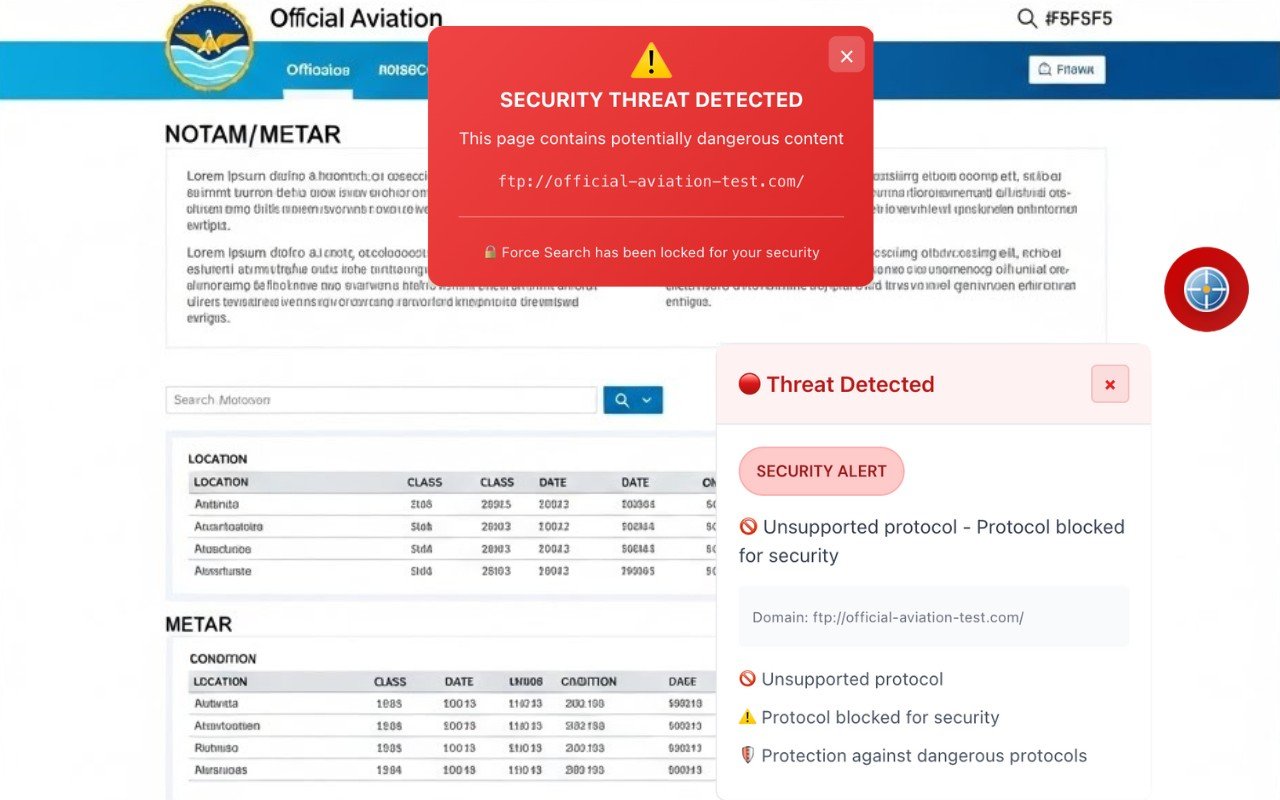
Figure 8: Simulation of access via a dangerous protocol (FTP). Even when the host appears to belong to a legitimate government source, NOTAMSpot blocks unsupported/insecure protocols and displays a red alert for a security threat, preventing the "Force Search" action to avoid unencrypted traffic and the risk of interception.
⚠️ Independent extension. Not affiliated with or endorsed by any government agency.
📖 What are Unsupported Protocols?
Unsupported protocols are network communication methods considered insecure or obsolete that should not be used to access sensitive sites, especially those containing critical aviation information.
Main protocols blocked:
| Protocol | Port | Status | Risk |
|---|---|---|---|
| HTTP | 80 | ❌ Insecure | No encryption |
| FTP | 21 | ❌ Insecure | Credentials in plain text |
| Telnet | 23 | ❌ Insecure | Unencrypted sessions |
| HTTPS | 443 | ✅ Secure | TLS/SSL encryption |
🔬 How Insecure Protocols Work
1. FTP (File Transfer Protocol)
Designed in 1971, FTP was created when the internet was a trusted network between universities – security was not a priority.
Critical problems:
a) Plain text transmission
text
Client → FTP Server

USER pilot123       ← Readable by any intermediary
PASS mypassword     ← Password visible without encryption
RETR metar.txt      ← Commands exposed
Anyone monitoring network traffic sees exactly what is being transmitted.
b) Unencrypted credentials
text
FTP login captured by attacker:

220 aisweb.decea.mil.br FTP server ready
USER capitao.silva
331 Password required
PASS SecretPass2024
230 User logged in

Attacker now has:
✓ User: capitao.silva
✓ Password: SecretPass2024
c) No data integrity
Files can be modified in transit without detection
Attacker can inject malicious data
Receiver has no way to verify authenticity
2. HTTP (HyperText Transfer Protocol)
HTTP does not encrypt communications between browser and server.
Vulnerabilities:
a) Eavesdropping
text
GET /metar?station=SBGR HTTP/1.1
Host: aviationweather.gov
Cookie: session=abc123xyz

← All data readable by intermediaries
b) Man-in-the-Middle (MITM)
text
Pilot → [Attacker] → Legitimate Server
           ↑
      Intercepts and modifies response

Original METAR: SBGR 081200Z 27035G50KT
Modified METAR: SBGR 081200Z 27008KT
                                ↑
                        Wind falsely reduced
c) Session hijacking
Session cookies stolen
Attacker authenticates as victim
Full account access without password
3. Protocol Downgrade Attacks
Attackers force systems to use old and vulnerable protocols.
Example – POODLE Attack:
text
Client attempts: TLS 1.3 (secure)

↓ Attacker intercepts handshake
↓ Forces downgrade: SSL 3.0 (broken since 2014)

↓ Attacker decrypts traffic with 256 requests
Result: Communication that should be secure is compromised.
⚠️ What Are the Risks?
For General Users
1. Credential Theft
Passwords transmitted in plain text via FTP/HTTP
Capture by sniffers on public networks (airports, cafes)
Unauthorized access to personal/corporate accounts
2. Data interception
text
Public WiFi network at airport:

Pilot accesses: http://aisweb.decea.mil.br
Attacker captures: Login + Password + Flight plan
Malicious use: Modifies route, steals sensitive data
3. Data manipulation
Files downloaded via FTP can be tampered with
Malware injected into downloads
Victim executes payload unknowingly
4. Regulatory non-compliance
PCI DSS: Prohibits transmission of card data via FTP/HTTP
HIPAA: Health data must be encrypted
GDPR: Personal data protection mandatory
Fines: Up to €20 million or 4% of global revenue
For Aviation (NOTAMSpot Users)
5. Intercepted and tampered METARs/TAFs
Real scenario:
text
Pilot on public WiFi accesses:
ftp://aviationweather.gov/metar/SBGR.txt

Attacker intercepts FTP:
1. Captures request
2. Serves fake METAR:
   SBGR 081200Z 09008KT 9999 FEW030
   (VFR safe - FALSE)

Reality at airport:
   SBGR 081200Z 27035G50KT 1200 -TSRA
   (IMC dangerous - REAL)

Pilot makes GO decision based on fake data
Risk: Accident due to unreported windshear
6. Exposed military credentials
text
Brazilian Air Force officer accesses via HTTP:
http://aisweb.decea.mil.br

Captured login:
- User: maj.santos
- Password: Falcon2024!
- IP: 200.xxx.xxx.xxx

Attacker uses credentials to:
✓ Access classified flight plans
✓ Modify NOTAMs for restricted areas
✓ Obtain aeronautical intelligence data
7. Modified flight plans
text
Pilot sends plan via insecure FTP:
ftp://ais.decea.mil.br/upload/plan.txt

Attacker intercepts and modifies:
- Original route: SBSP DCT SBGR
- Modified route: SBSP [restricted area] SBGR
                          ↑
                    Presidential TFR

Consequence:
- Airspace violation
- $50,000 fine
- License suspension
8. Omitted NOTAMs
text
Legacy system serves NOTAMs via HTTP:
http://notam.decea.mil.br/query

MITM attacker removes critical NOTAM:
"SBGR RWY 09R/27L CLOSED - MAINTENANCE"

Pilot plans landing on 27L
ATC rejects clearance
Critical fuel → emergency
📊 Problem Statistics
Global incidence (2024):
45% of organizations still lack a complete encryption plan
FTP still in use: 30% of regulated sectors (healthcare, finance) use FTP without SFTP/FTPS
HTTP without redirect: 18% of government sites allow HTTP even with HTTPS available
Downgrade attacks: 120% increase in 2024 vs 2023
Regulations prohibiting insecure protocols:
PCI DSS (Payment Card Industry): Prohibits FTP/HTTP for card data
HIPAA (Health Insurance): Requires encryption in transit
GLBA (Gramm-Leach-Bliley): Requires financial data protection
ANAC/FAA: Aviation systems must use secure protocols
Penalties for violations:
Fines in the millions of dollars
Operations suspension
Loss of certifications (ISO 27001, SOC 2)
🛡️ How NOTAMSpot Protects
NOTAMSpot implements proactive blocking of insecure protocols:
1. Protocol Validation at URL Start
javascript
Extracts protocol from visited URL.
const protocol = url.split(':')[0].toLowerCase();

// List of blocked protocols
const BLOCKED_PROTOCOLS = [
  'ftp',      // File Transfer Protocol
  'ftps',     // FTP over SSL (still vulnerable)
  'http',     // HyperText Transfer Protocol
  'telnet',   // Terminal Network
  'gopher',   // Gopher Protocol (obsolete)
  'file',     // Accessing local files
];

if (BLOCKED_PROTOCOLS.includes(protocol)) {
  return {
    blocked: true,
    reason: 'UNSUPPORTED_PROTOCOL',
    protocol: protocol,
    risk: 'CRITICAL'
  };
}
2. Allowed Protocols Whitelist
Only secure protocols are accepted:
javascript
const ALLOWED_PROTOCOLS = [
  'https',    // HTTP over TLS/SSL
  'wss',      // WebSocket Secure
];

// Validates against whitelist
if (!ALLOWED_PROTOCOLS.includes(protocol)) {
  blockAccess('Protocol is not on the permitted list');
}
3. Specific Validation for Aviation Domains
Official aviation websites must use HTTPS:
javascript
const AVIATION_DOMAINS = [
  'aisweb.decea.mil.br',
  'aviationweather.gov',
  'redemet.decea.mil.br',
  'notams.aim.faa.gov',
  // ... 50+ domínios
];

function validateAviationProtocol(url, hostname) {
  const protocol = new URL(url).protocol.replace(':', '');

  // Verifica se é domínio de aviação
  if (AVIATION_DOMAINS.includes(hostname)) {
    // EXIGE HTTPS
    if (protocol !== 'https') {
      return {
        blocked: true,
        reason: 'AVIATION_DOMAIN_REQUIRES_HTTPS',
        attempted: protocol,
        required: 'https',
        domain: hostname
      };
    }
  }

  return { blocked: false };
}
4. Detection of Downgrade Attempts
Monitors attempts to force insecure protocols:
javascript
// Histórico de URLs visitadas
const urlHistory = [];

function detectDowngradeAttempt(currentURL) {
  const previous = urlHistory[urlHistory.length - 1];

  if (previous && currentURL) {
    const prevProtocol = new URL(previous).protocol;
    const currProtocol = new URL(currentURL).protocol;
    const prevHost = new URL(previous).hostname;
    const currHost = new URL(currentURL).hostname;

    // Mesmo host, mas protocolo degradado
    if (prevHost === currHost &&
        prevProtocol === 'https:' &&
        currProtocol === 'http:') {
      return {
        detected: true,
        type: 'PROTOCOL_DOWNGRADE',
        from: 'https',
        to: 'http',
        risk: 'HIGH',
        possibleMITM: true
      };
    }
  }

  urlHistory.push(currentURL);
  return { detected: false };
}
5. Blocking with Correction Suggestion
When an insecure protocol is detected, it offers a secure alternative:
javascript
function suggestSecureAlternative(blockedURL) {
  const url = new URL(blockedURL);

  // Converts to HTTPS
  url.protocol = 'https:';

  return {
    blocked: blockedURL,
    suggested: url.toString(),
    message: 'Redirecting to secure version (HTTPS)',
    autoRedirect: true  // Automatically redirects
  };
}
Example:
URL attempted:  http://aisweb.decea.mil.br

Blocked:        ✓

Suggested:      https://aisweb.decea.mil.br

Action:         Automatic redirect
🎯 Protection Interface
When a secure protocol is used:
text
✅ SECURE CONNECTION VALIDATED

🔒 Protocol: HTTPS (TLS 1.3)
📋 Domain: aisweb.decea.mil.br
🛡️ Certificate: Valid until 06/15/2026
✓ Strong encryption (AES-256-GCM)
✓ Guaranteed integrity
When an insecure is detected:
text
⚠️ SECURITY THREAT DETECTED

🚫 Protocol not supported
URL attempted: ftp://aisweb.decea.mil.br/
Protocol: FTP (File Transfer Protocol)

⚠️ Identified risks:
• Credentials transmitted in plain text
• Unencrypted data
• Vulnerable to interception
• Not compatible with security policies

🔒 Protocol blocked for security reasons
Aviation websites require HTTPS

✅ Secure alternative available:
https://aisweb.decea.mil.br/

[Access Secure Version] [Report Problem]
When downgrade is detected:
text
⚠️ POSSIBLE ATTACK DETECTED

🎯 Protocol downgrade attempt
Previous connection: https://aisweb.decea.mil.br
Current attempt: http://aisweb.decea.mil.br

🚨 Man-in-the-Middle Indicators:
• Same domain, degraded protocol
• Possible active interception
• High risk of compromised data

🛡️ Access automatically blocked
Maintaining secure protocol (HTTPS)

✅ Reconnecting via HTTPS...
📋 Protocol List – Security Status
| Protocol | Port | Encryption | SCG Status | Recommended Use |
|---|---|---|---|---|
| HTTP | 80 | ❌ None | 🚫 BLOCKED | Never for sensitive data |
| HTTPS | 443 | ✅ TLS 1.2+ | ✅ ALLOWED | Only acceptable for web |
| FTP | 21 | ❌ None | 🚫 BLOCKED | Obsolete, use SFTP |
| SFTP | 22 | ✅ SSH | ⚠️ RESTRICTED | OK for internal transfers |
| FTPS | 990 | ✅ TLS/SSL | ⚠️ RESTRICTED | Prefer SFTP |
| Telnet | 23 | ❌ None | 🚫 BLOCKED | Obsolete, use SSH |
| SSH | 22 | ✅ SSH | ✅ ALLOWED | Secure terminal |
| WSS | 443 | ✅ TLS | ✅ ALLOWED | Secure WebSocket |
🚨 Specific Use Cases
Accessing METARs/TAFs
❌ INSECURE:
bash
ftp://aviationweather.gov/data/metar/SBGR.TXT
# Protocol: FTP (blocked)
# Risk: Data can be tampered with.
✅ SECURE:
bash
https://aviationweather.gov/data/api/metar?ids=SBGR
# Protocol: HTTPS (allowed)
# Protection: TLS 1.3 encryption
NOTAM Queries
❌ INSECURE:
http://notams.aim.faa.gov/notamSearch
# Protocol: HTTP (blocked)
# Risk: Session may be hijacked
✅ SECURE:
https://notams.aim.faa.gov/notamSearch
# Protocol: HTTPS (allowed)
# Protection: Encrypted session cookies
✈️ Conclusion
Insecure protocols such as FTP and HTTP transmit data without encryption, exposing credentials, METARs, TAFs, and NOTAMs to interception and tampering. In aviation, where decisions based on meteorological information can determine flight safety, ensuring the integrity and confidentiality of data is critical.
NOTAMSpot proactively blocks insecure protocols, requires HTTPS for all official aviation domains, and detects downgrade attempts that indicate man-in-the-middle attacks, protecting 100% of connections before any sensitive data is transmitted.
✅ 7. Typosquatting Detection
Validate URLs with missing or duplicate letters:
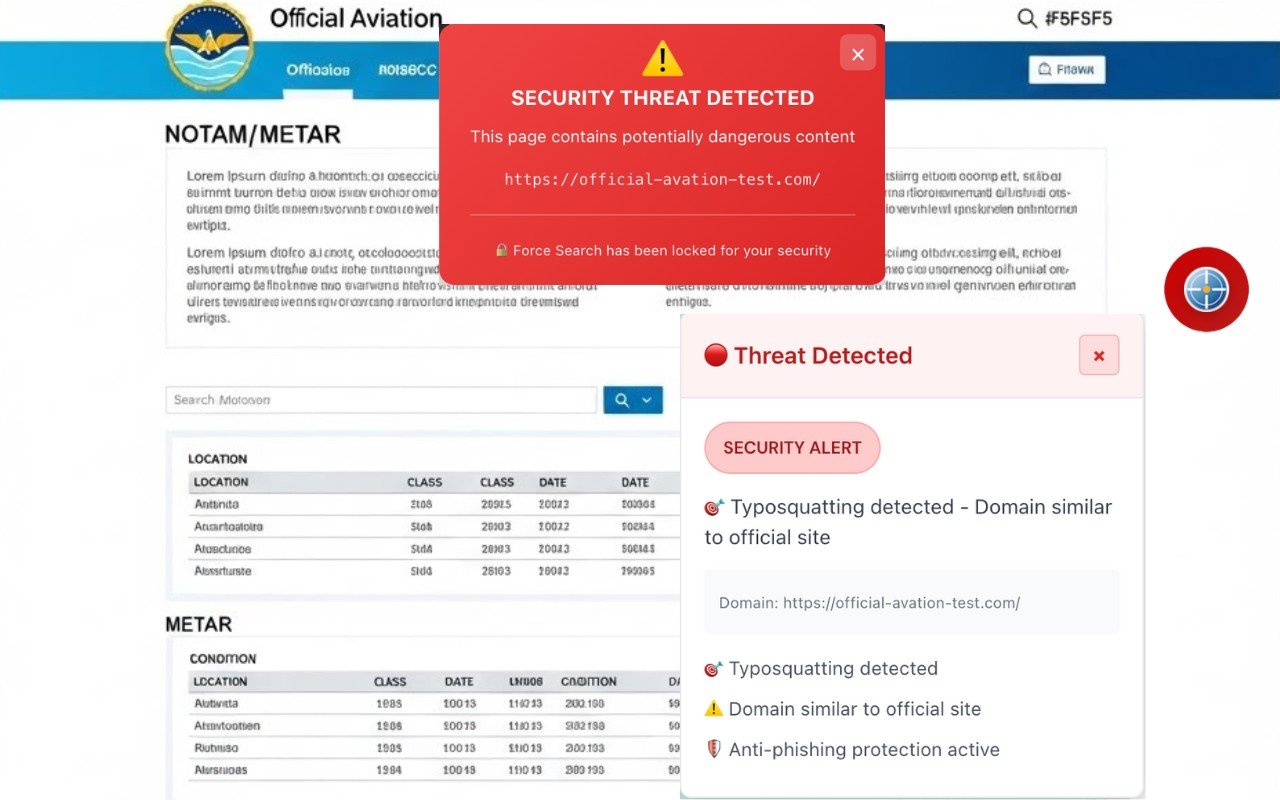
Figure 9: Simulation of typesquatting by visual similarity: a fraudulent website replicates the appearance of an official portal to deceive the user. NOTAMSpot detects the domain as similar to a verified aeronautical source, displays a red threat alert, and blocks the “Force Search” action, reducing the risk of credential collection and dissemination of malicious content.
⚠️ Independent extension. Not affiliated with or endorsed by any government agency.
📖 What is Typosquatting?
Typosquatting Typosquatting (also called URL hijacking or domain mimicry) is a social engineering attack where cybercriminals register domains with intentional typos of popular websites, expecting users to make mistakes when typing URLs. typos intentional tactics from popular websites, hoping that users will make mistakes when typing URLs.
How it works
Attackers exploit common human errors when typing addresses in the browser bar:
1. Spelling errors:
facbook.com→facebook.comgoggle.com→google.comamazan.com→amazon.com
2. Adjacent keys (QWERTY typos):
foogle.com,hoogle.com,boogle.com→google.com
3. Duplicate/omitted letters:
faceebook.com→facebook.comyuube.com→youtube.com
4. Wrong extensions:
facebook.cm→facebook.comairfrance.co→airfrance.com
5. Malformed WWW:
wwwfacebook.com(without dot) →www.facebook.com
6. Visual substitution:
rnarriott.com(rn looks like m) →marriott.com
Malicious objectives
Credential phishing:
Fake page identical to original requests login
User types email/password thinking they're on legitimate site
Credentials are stolen and resold or used for invasion
Malware distribution:
Visitors are redirected to automatic downloads
Examples: Magniber ransomware exploited typos in popular domains via Chrome/Edge
Installation of PUPs (Potentially Unwanted Programs)
Advertising fraud:
Fake domains filled with fraudulent ads
Example:
amazan.comredirected to malicious ad pages
Disinformation campaigns:
Fake sites publish fabricated news
Example:
wikiepdia.orgpoderia publicar artigos falsificados
Cryptocurrency theft:
2024 study documented thousands of crypto transactions sent to typosquatting addresses
Users typed wrong wallet addresses
Documented real cases
Google/Goggle.com (2006):
First major case; domain operated as a phishing site for years.
Microsoft/Hotmail typos (Alf Temme):
Registered ho0tmail.com, hot5mail.com redirecting to a website for exercise equipment; Microsoft sued for $2.4M
Air France:
airfrance.com diverted traffic for fraudulent travel sales
Lands End:
Typosquatters registered dozens of variations (lnadsend.com, klandsend.com) to exploit affiliate programs
How NOTAMSpot protects
Based on the simulation description you mentioned earlier (aisweb.deceeа.mil.br), the system implements multiple detection layers:
1. 1. Domain similarity analysis
Compares visited hostname with list of known official sites (whitelist)
Calculates edit distance (Levenshtein distance) between domains
Detects variations with 1-2 different characters
2. Typosquatting pattern detection
javascript
// Examples of patterns detected:
- Duplication of letters: aiswebb.decea.mil.br
- Omission of letters: aiswb.decea.mil.br
- Swapping adjacent letters: iasweb.decea.mil.br
- Incorrect extensions: aisweb.decea.mil.com
- Character insertion: aisweeb.decea.mil.br
3. Validation against official aviation domains
Maintains a curated list of legitimate portals:
aisweb.decea.mil.braviationweather.govredemet.decea.mil.brnotams.aim.faa.gov
4. Immediate visual alert
When it detects typosquatting:
❌ Displays red "THREAT DETECTED" alert
📊 Shows message: "Typosquatting detected – Domain similar to official site"
🚫 Blocks access to page content
🔍 Suggests the correct domain to the user
5. 5. Aviation-specific protection
Critical in aeronautical context because:
Pilots access METARs/TAFs/NOTAMs from official sites
Tampered weather data can cause unsafe flight decisions
Typosquatting of aviationweather.gov → aviationwether.gov could serve false information
aviationweather.gov→aviationwether.govpoderia servir informações falsasStolen credentials from aisweb.decea.mil.br allow unauthorized access to critical systems
This multi-layered protection ensures that even users typing URLs quickly (common in flight operations under pressure) are not victims of malicious domains visually identical to official weather and NOTAM portals.
✅ 8. Combosquatting Detection
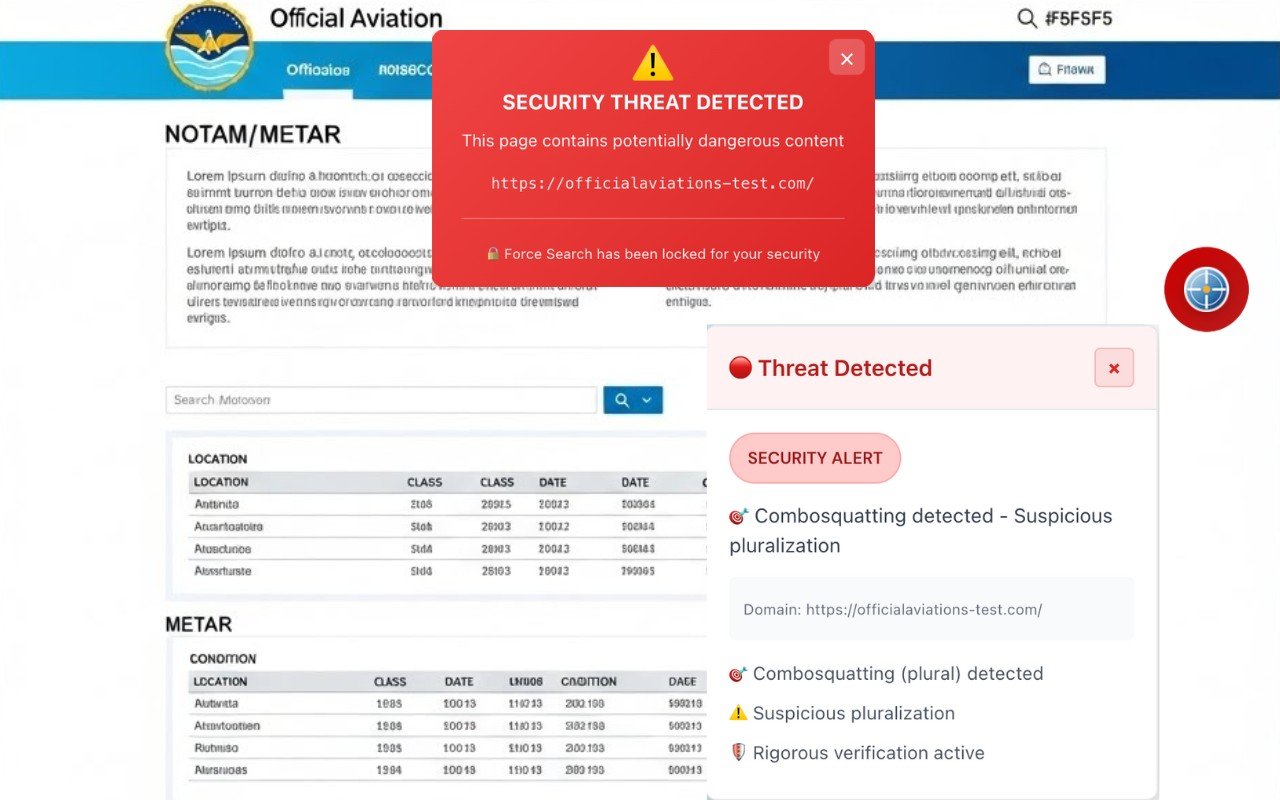
Figure 10: Simulation of combosquatting: NOTAMSpot detects domain manipulation through subtle variations (pluralization and/or suspicious hyphen insertion), a common technique for imitating official portals. Upon identifying the pattern, the system displays a red security threat alert and blocks the "Force Search" action, preventing the user from interacting with a potentially fraudulent address.
⚠️ Independent extension. Not affiliated with or endorsed by any government agency.
📖 What is Combosquatting?
Combosquatting is a cyberattack technique where attackers register domains that combine a legitimate brand with additional words (usually separated by hyphens) to create URLs that appear official but are fraudulent.
Fundamental difference from Typosquatting
| Attack | Method | Example |
|---|---|---|
| Typosquatting | Exploits typing errors | gogle.com, amazom.com |
| Combosquatting | Adds legitimate words | google-login.com, amazon-security.com |
In combosquatting, there is no typo — the brand name is correct, but comes with terms that create a false sense of legitimacy.
How it works
Common combosquatting patterns
1. Urgency/security terms:
paypal-security.commicrosoft-alert.comnetflix-verify.com
2. Functional terms:
amazon-shop.comfacebook-login.comapple-support.com
3. Geographic terms:
google-brasil.comskype-international.com
4. Technical terms:
microsoft-online.comoffice365-cloud.com
Distribution strategies
Unlike typosquatting (which depends on users mistyping), combosquatting uses:
Phishing emails with embedded malicious links
Paid ads (malvertising) in search engines
Manipulated SEO search results
SMS/WhatsApp with fraudulent links
Social media with fake sponsored posts with fake sponsored posts
Scale of the problem
Georgia Tech/Stony Brook Study (2017):
Identified orders of magnitude more combosquatting domains than typosquatting
Attack space is almost infinite (attackers can combine any word)
Domains cost less than $1 to register
Used in all types of known cyberattacks
SSL Certificate Data (Let's Encrypt):
468,000+ certificates issued for combosquatting domains
Only 3,011 certificates for typosquatting
Confirms they are distinct attacks with different strategies
Malicious objectives
1. Credential harvesting:
outlook-alert.comsimulates Microsoft security alertUser types email/password thinking they're on official portal
Credentials are stolen instantly
2. Nation-state attacks:
Authoritarian governments use combosquatting for targeted phishing
Example:
google-security.comused in cyber espionage
3. Drive-by downloads:
Visitors are automatically infected with malware
Ransomware, botnets, spyware
4. Business Email Compromise (BEC):
Fraudulent emails appear to come from corporate domains
microsoft-login.comused to attack employeesAverage losses of $120,000 per successful BEC attack
5. Financial fraud:
paypal-payments.comdiverts legitimate paymentsstripe-billing.comsteals credit card data
Why it can fool even security professionals
Quote from researcher Panagiotis Kintis (Georgia Tech):
“These attacks can even fool security people who may be looking at network traffic for malicious activity. When they see a familiar trademark, they may feel a false sense of comfort with it.”
Reasons:
Brand is correct — there is no apparent spelling error
Additional words seem legitimate — "security", "login", "support" are expected terms
Valid SSL certificates — many malicious domains have HTTPS/green padlock
Superficial traffic analysis — logs show "amazon-shop.com" and analysts assume it's legitimate
Documented real cases
Netflix phishing (2023):
netflix-payments.comused to steal card dataFraudulent emails claimed "billing problem"
Thousands of victims before takedown
Microsoft Office 365:
login.microsoftonline.comis legitimateAttackers created
microsoft-login.com,office365-signin.comUsed in BEC campaigns against Fortune 500 companies
Amazon shopping:
amazon-shop.com,amazon-deals.comRedirected to phishing sites or malware
How NOTAMSpot protects
Based on the description mentioned (aviation-weathers.gov), the system detects combosquatting through:
1. Suspicious hyphen pattern analysis
javascript
// Detects hyphen insertions not present in the official domain
aviationweather.gov → ✅ LEGÍTIMO
aviation-weathers.gov → 🚫 COMBOSQUATTING (hyphen + "s" extra)
aviation-weather.gov → 🚫 COMBOSQUATTING (hyphen inserted)
2. Validation against known domains
Maintains list of official portals without hyphens:
aviationweather.govaisweb.decea.mil.brredemet.decea.mil.br
Any variation with hyphen is automatically suspicious.
3. Trigger word detection
Identifies common combosquatting combinations in aviation:
aviation-weather,aviation-metaisweb-login,aisweb-securenotam-faa,metar-taf
4. Specific visual alert
When combosquatting is detected:
❌ Red alert: "SECURITY THREAT DETECTED"
📊 Message: "Combosquatting detected – Suspicious hyphen insertion"
🔍 Shows the correct legitimate domain
🚫 Blocks access to malicious content
5. Critical protection for aviation
Why is it especially dangerous in aviation:
Falsified METARs/TAFs:
aviationweather-gov.comcould serve tampered weather dataPilot makes flight decision based on false information
Risk of accident due to actual unreported conditions
Fraudulent NOTAMs:
notams-faa.govmay omit airspace restrictionsInadvertent violations of TFRs (Temporary Flight Restrictions)
Fines of $10,000+ or license suspension
Pilot credential theft:
aisweb-login.decea.mil.brcaptures military pilot loginsUnauthorized access to flight planning systems
Compromise of sensitive missions
NOTAMSpot acts as a last line of defense, blocking access even when the user clicks on phishing links in fraudulent emails, protecting critical aviation operations against falsified weather information/NOTAMs.
🚫 Layer 2: Security Blacklist (Proactive Blocking)
Objective
Proactively block entire categories of sites that should not display aeronautical content, even if they are not malicious.
Detection Categories
Note: NOTAMSpot operates as a browser overlay on publicly accessible portals. Listing below does not imply affiliation, partnership, or endorsement by the respective agencies.
🔐 1. Authentication & SSO
Blocks login/authentication pages to prevent accidental credential capture:
| Detected Keywords | Blocked Examples |
|---|---|
auth, login, signin, oauth | login.microsoft.com, accounts.google.com |
...💰 2. Banking & Finance
Blocks financial sites to prevent confusion between tabs:
internetbanking.caixa.gov.br 🚫 BLOCKED
login.itau.com.br 🚫 BLOCKED
www.bankofamerica.com 🚫 BLOCKED
...
🛒 3. E-commerce & Shopping
amazon.com/checkout 🚫 BLOCKED
mercadolivre.com.br 🚫 BLOCKED
...
👥 4. Social & Gaming
facebook.com 🚫 BLOCKED
twitter.com 🚫 BLOCKED
www.snapchat.com 🚫 BLOCKED
...
🌐 5. CDNs & External APIs
amazonaws.com 🚫 BLOCKED
cloudflare.com 🚫 BLOCKED
cloud.google.com 🚫 BLOCKED
...
⚠️ Layer 3: Security Analyzer (Malicious Code Detection)
Objective
Detect malicious code injections (XSS) even on whitelist-approved sites, protecting against compromise of legitimate domains.
Basic Protections Implemented
🔍 1. XSS Pattern Detection
Detects classic XSS patterns in page HTML:
xml
<script>alert('XSS')</script>
<img src=x onerror="alert(1)">
<iframe src="javascript:alert(1)">


<script src="https://cdn.official.gov/widget.js"></script>
🛡️ 2. Content Security Policy (CSP) Validation
Verifies if the site implements adequate CSP:
✅ APPROVED:
Content-Security-Policy: default-src 'self'; script-src 'self' https://trusted.cdn.gov

❌ WARNING:

(no CSP header or with 'unsafe-inline')
🔗 3. External Resource Analysis
Monitors loading of suspicious external resources:
| Resource | Status |
|---|---|
<script src="https://aviationweather.gov/js/app.js"> | ✅ Whitelisted domain |
<script src="https://evil.com/inject.js"> | ❌ Unauthorized domain |
<iframe src="https://ads.network.com"> | ⚠️ Alert: External iframe |
Known Limitations (Transparency)
⚠️ This module offers BASIC protection against XSS.
🎯 Complete Validation Workflow
text
1. User accesses URL
   │
2. ┌─ LAYER 1: Whitelist ─────────────────┐
   │  • HTTPS?                             │
   │  • Secure context?                    │
   │  • Homograph attack?                  │
   │  • Official domain?                   │
   │  • Authorized subdomain?              │
   └───────┬───────────────────────────────┘
           │
      ✅ Approved?
           │
           ├─ YES ──▶ 3. LAYER 2: Blacklist ──┐
           │            • Sensitive category?   │
           │            • Banking/Auth/Social?  │
           │            └────┬──────────────────┘
           │                 │
           │            ✅ Not blocked?
           │                 │
           │                 ├─ YES ──▶ 4. LAYER 3: Analyzer
           │                 │            • XSS present?
           │                 │            • Valid CSP?
           │                 │            • External resources OK?
           │                 │            └────┬──────────
           │                 │                 │
           │                 │            ✅ All clear?
           │                 │                 │
           │                 │                 ├─ YES ──▶ 🟢 ALLOWED
           │                 │                 └─ NO ──▶ 🟡 ALERT
           │                 │
           │                 └─ NO ──▶ 🔴 BLOCKED (Blacklist)
           │
           └─ NO ──▶ 🔴 BLOCKED (Whitelist)